
The best choice depends on whether you need to record speech, transfer older audio, or make CDs: the Sony RCD-W500C is the closest fit for CD recording, while the Music Digitizer is intended for capturing audio through line inputs. The 16GB and Tonfarb recorders are better suited to lectures and meetings, and the Plaud Note Pro focuses on transcription and summaries. These products do not all perform the same job, so check the format and workflow you need before choosing.
| Product | Best suited for | Key distinction |
|---|---|---|
| Sony RCD-W500C CD Player / Recorder | CD playback and recording | A dedicated CD player/recorder |
| Music Digitizer CD Recorder | Capturing external audio | 3.5mm and RCA line inputs |
| Tonfarb 136GB Digital Voice Recorder | Long recording capacity | Voice activation and A-B repeat |
| 16GB Digital Voice Recorder | Lectures and playback | USB rechargeable design |
| Plaud Note Pro AI Voice Recorder | Transcription and meeting notes | AI transcription and summaries |
Sony RCD-W500C CD Player / Recorder

The Sony RCD-W500C is the most directly relevant product for shoppers specifically seeking a CD recorder. Its product name identifies it as both a CD player and recorder, rather than a portable voice recorder or a computer-based audio capture tool.
Best for: Buyers who want a component designed around CD playback and recording. It is the clearest match in this selection for making or playing CDs without treating a standard digital voice recorder as a disc burner.
Why it was selected: The keyword includes “CD burner,” and this is the only listed product explicitly identified as a CD recorder. That makes it a more suitable starting point for CD-focused needs than the speech recorders.
Limitation: The supplied product information does not specify supported disc formats, recording sources, or whether it can copy a particular type of audio. Confirm those details for your intended setup before buying.
Music Digitizer With RCA And 3.5mm Inputs

This Music Digitizer is described as an audio capture device and converter for cassette and MP3 audio. Its listed connections include 3.5mm and RCA line inputs, which are useful details for buyers checking whether an existing audio source can connect to the device.
Best for: Someone who wants to capture audio from a compatible line-output source, such as an older audio component, and needs RCA or 3.5mm input options. Choose it if transferring audio is the priority rather than recording spoken notes on the go.
Why it was selected: It addresses the digitizing side of a voice-recorder-and-CD-burner search. Capturing audio and burning a CD are separate steps, however; the product name alone does not establish that it writes audio to discs.
Limitation: The provided details do not identify a built-in CD burner or explain the required software, storage destination, or supported recording formats. Do not assume it can create CDs without checking its complete specifications.
Tonfarb 136GB Digital Voice Recorder
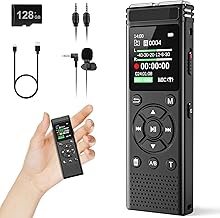
The Tonfarb recorder is presented as a 136GB digital voice recorder with playback. Its listed functions include voice-activated recording, noise reduction, A-B repeat, MP3 playback, and password protection. The product title also states a recording capacity of 9,775 hours; actual recording time can depend on settings and file format, which are not included in the supplied details.
Best for: Buyers who prioritize substantial stated storage and want features for reviewing recordings. A-B repeat can be relevant for replaying a selected segment, while voice activation may suit situations where continuous recording is not necessary.
Why it was selected: It offers more recording-focused features than a CD component and is specifically marketed for lectures, meetings, classes, and interviews.
Limitation: This is a voice recorder, not a CD burner. The supplied information does not confirm its file-transfer method or how to move recordings onto a computer for disc creation.
16GB Rechargeable Digital Voice Recorder

This 16GB digital voice recorder is described as a small tape-recorder-style device with playback and USB recharging. The product listing positions it for lectures, making it a straightforward option for buyers who want to record spoken material and listen back later.
Best for: Students or note-takers looking for a compact recorder with playback and a stated 16GB capacity. It is better suited to basic lecture recording than to someone who needs a dedicated disc-recording component or advanced transcription workflow.
Why it was selected: The keyword includes voice recording, and this model clearly identifies itself as a digital voice recorder with playback. Its rechargeable design is also a relevant feature for regular portable use.
Limitation: The listed details do not specify recording time, file formats, or an included CD-burning function. Buyers who need to archive recordings on discs should check how files can be transferred and whether a separate computer burner is required.
Plaud Note Pro AI Voice Recorder

The Plaud Note Pro is described as an AI voice recorder for transcribing and summarizing meetings and calls. Its listed features include support for 112 languages, an InstantView display, an ultra-slim design, and an included case.
Best for: Professionals and teams who want recordings paired with transcription and summaries. Choose it if the goal is to turn spoken conversations into written notes, rather than simply collect audio for later playback.
Why it was selected: It expands the voice-recorder choices for buyers whose main need is meeting documentation. The stated transcription and summary functions distinguish it from the basic lecture-oriented recorders in this group.
Limitation: It is not identified as a CD burner. The supplied details do not explain service requirements, transcription limits, export options, or how to create a disc from its recordings, so check those points if they matter to your workflow.
Buying Guide: How To Choose A Voice Recorder And CD Burner
Do you need to record speech, transfer audio, or burn a CD?
Start by separating the three tasks. A voice recorder captures spoken audio. An audio digitizer accepts input from another audio source, such as a device connected through RCA or 3.5mm line inputs. A CD recorder writes audio to discs. A product that records sound does not automatically have the hardware or software needed to burn a CD.
If making CDs is your main goal, look for a product explicitly described as a CD recorder or burner. The Sony is the only listed product identified that way. If you need to capture audio from an external source, examine the Music Digitizer’s input connections and verify what destination or software it requires.
Which features matter for lectures and meetings?
For lectures, compare storage, playback, charging, and the controls needed to review recordings. The 16GB model is described as rechargeable and includes playback. The Tonfarb lists a larger 136GB capacity, voice activation, noise reduction, and A-B repeat. Capacity alone does not tell you how long a device records at a particular quality; recording settings and file formats can affect duration.
For meetings, consider whether you need an audio file only or written notes as well. The Plaud Note Pro is marketed for transcription and summaries. Check the product’s full terms and file-export details before relying on those functions for work records.
How will you move recordings to a CD?
Check the complete transfer chain before purchasing: the recorder’s output or file-transfer method, a computer or compatible audio component if needed, and a device that can write the required disc format. The supplied information for the portable recorders does not confirm CD-burning capability. Do not assume that USB charging also means USB file transfer; verify the product documentation.
Also identify the source of the audio. A line input may suit a compatible player or audio component, while a built-in microphone is typically the relevant recording method for spoken notes. Confirm connections at both ends and check that the source output matches the digitizer input.
What should you compare before buying?
- Primary task: Choose a CD recorder for disc writing, a digitizer for external audio capture, or a voice recorder for portable speech recording.
- Connections and transfer: Confirm input types, output methods, and any computer or software requirements in the full product details.
- Storage and recording time: Compare stated capacity, but verify how recording quality and file settings affect usable hours.
- Playback and review: Look for playback or features such as A-B repeat if you need to revisit specific sections.
- Transcription needs: Select a model with stated transcription functions only if written notes are important, and check export and service details.
- Disc requirements: Verify supported media and recording sources when selecting a CD component; these details are not provided for every product here.
Frequently Asked Questions
Can a digital voice recorder burn CDs?
Not necessarily. Recording audio and writing audio to a CD are different functions. The product must explicitly support CD recording or work with a separate computer and disc burner.
Which listed product is specifically identified as a CD recorder?
The Sony RCD-W500C is named as a CD player and recorder. Confirm supported discs and recording sources in its complete product information before purchasing.
Which option has RCA and 3.5mm inputs?
The Music Digitizer listing specifies both RCA and 3.5mm line inputs. Check that your audio source provides a compatible output and verify how captured files are stored or transferred.
Which recorder is aimed at lectures?
The 16GB digital voice recorder is described for lectures and includes playback and USB recharging. The Tonfarb is also marketed for lectures, meetings, classes, and interviews.
Which product lists transcription and summaries?
The Plaud Note Pro is described as an AI voice recorder for transcription and summaries, with stated support for 112 languages. Check its full terms and export options for your intended use.