
The best volume control audio cable depends on your headset and how you use it. PChero is a practical choice for extending a standard 3.5 mm connection, while the Astro-compatible options are designed for gaming headsets. Houseen adds an inline microphone mute control for supported HyperX models. Check your headset’s connector and compatibility before choosing: cables that look similar may not fit or provide the same controls.
| Product | Best For | Standout Feature |
|---|---|---|
| PChero 3.5mm Extension Cable | General headphone extension | Inline volume control; two cables included |
| ienza Astro Replacement Cable | Astro A10 and A40 users | 2 m cable with volume wheel |
| MJKOR Astro Cable | Astro A10 and A40 users | 2 m length and nylon-braided cord |
| Mcbazel Astro Cable | Astro A10, A30, A40, and A40TR users | Volume wheel and listed console support |
| Houseen Headset Cable | Compatible HyperX Cloud users | Inline volume wheel and microphone mute |
PChero 3.5mm Headphone Extension Cables

PChero’s two-cable set is best for listeners who want to extend a standard 3.5 mm audio connection and add a convenient volume adjustment. Each cable uses a 3.5 mm male-to-female connection, carries stereo audio, and has an inline volume control. The listed PVC construction is described as soft and easy to wind for storage.
Choose this option if your headphones use a standard 3.5 mm audio jack and you need more cable reach. Its male-to-female format is different from a headset replacement cable with male plugs at both ends, so check the connection type before ordering. The product information does not list a microphone or microphone-mute function, so avoid it if those controls are essential.
ienza Astro A10 and A40 Replacement Cable

This 2 m replacement cable is best for Astro A10 owners and is also listed as compatible with Astro A40 headsets. Its inline volume wheel provides quick adjustment without reaching for the connected device. The listed connections make it suitable for an A10 connected to a controller, and the product information also specifies PC use with a 3.5 mm combo jack and Xbox One Series X/S, PS4, and PS5 controllers.
Choose this cable if you need an Astro-specific replacement with a volume wheel and a stated console-use case. Its main limitation is important for headset users: the cable has no mute button. The listing says this is the volume-control cable included with the A10 headset, so confirm that its connector arrangement matches your particular setup before buying.
MJKOR 2M Astro Volume Control Cable

MJKOR’s cable is another 2 m option for Astro A10 and A40 headsets. It uses a scroll wheel for inline volume adjustment and has a nylon-braided cord. The product details describe a five-pole connection for the headset and a four-pole connection for the audio device, and state compatibility with PS4 and PC through a 3.5 mm jack.
This cable is best for an Astro owner who wants a replacement cord with a volume wheel and clearly described plug arrangements. It is better suited to buyers who have checked those connector details than to shoppers seeking a universal cable. The manufacturer states that it has no microphone mute control and no mic output function, so avoid it if you need the cable itself to carry microphone audio or mute the mic.
Mcbazel Astro Headset Cable With Volume Wheel

Mcbazel is best for buyers with one of the listed Astro models: A10, A30, A40, or A40TR. Its 2 m cable has a built-in roller wheel for adjusting volume and uses a 3.5 mm connection. The product listing names PS5, PS4, Xbox Series X/S, Xbox One, PC, and most smartphones as supported devices.
Choose this option if your headset is one of the listed models and you want an inline volume wheel. The listing specifies a five-pole headset connection and a four-pole device connection, which makes checking the plug orientation worthwhile before purchase. It provides volume control only; it does not list a mute function. The product information also says it is not compatible with other headset models, so it is not the right pick for a general-purpose replacement.
Houseen Headset Cable With Mute And Volume
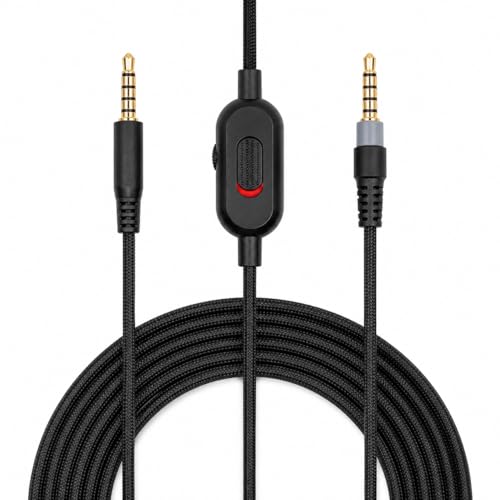
Houseen is best for buyers with a compatible HyperX Cloud headset who want both an inline volume wheel and a microphone mute switch. The listing identifies HyperX Cloud Mix and Cloud Alpha among the named models and describes the cable as detachable. Its mute switch can turn the headset microphone off or on, while the wheel adjusts gameplay volume.
Choose this cable when both controls matter and your headset matches the stated compatibility. Unlike the Astro options above, this is not presented as a universal 3.5 mm replacement. The product details repeat “HyperX Cloud” without providing a full compatibility list, so verify the exact headset model and connector before ordering. Do not select it solely because your headset has a 3.5 mm port.
Buying Guide: How To Choose A Volume Control Audio Cable
A volume control audio cable places an adjustment wheel or control on the cord, letting you change listening level without navigating a device’s settings. The right choice depends on more than the presence of a volume wheel. Connector shape, headset compatibility, cable layout, microphone support, and length all affect whether a replacement cable will work for your setup.
Does the cable fit your headset?
Start with the headset model, not just the plug’s appearance. A cable may use a familiar 3.5 mm connection but still be designed for a specific headset or require different pole arrangements at each end. The Astro options in this list name particular models, while Houseen names HyperX Cloud models. PChero is a male-to-female extension cable, not a model-specific headset replacement.
- Look up the exact headset model name, including any generation or suffix.
- Compare the cable’s connection type and plug arrangement with your existing cable.
- Check whether the listing names your headset rather than assuming a similar model will fit.
- Confirm whether you need a replacement cable or an extension for an existing one.
Do you need volume only, or microphone controls too?
Inline volume control and microphone control are separate features. The Astro cables listed here provide a volume wheel, but the product information for the Ienza and MJKOR cables specifically says there is no mute button. MJKOR also states that the cable has no mic output function. Houseen is the option in this selection that explicitly lists an inline microphone mute switch as well as volume adjustment.
If you use a headset microphone for calls or multiplayer games, check that the replacement cable supports the microphone connection required by your headset. Do not assume that a cable carrying stereo audio also carries microphone audio. When microphone use is not needed, a volume-only cable may be sufficient, provided it fits the headset.
What cable length works for your setup?
Length affects how freely you can move and where the control sits during use. The Astro replacement cables from Ienza, MJKOR, and Mcbazel are listed as 2 m long. That may suit a setup where the headset connects to a nearby controller or device, but measure the path from the headset to the connection point if placement is uncertain.
PChero is an extension cable, so consider the total reach after connecting it to your existing cable. The NewFantasia replacement cables in the product listings are 1.3 m long, but they are designed for named headphone families and are not among the five general picks above. Avoid selecting by length alone: connector type and model compatibility come first.
Should you buy a replacement cable or an extension?
A replacement cable connects directly between a headset and an audio device, assuming the plugs match both. An extension cable adds distance to an existing connection through a male-to-female layout. PChero is the extension-style option in this guide. The Astro and Houseen products are presented as replacement headset cables. Choosing the wrong format can leave you with a cable that cannot connect as intended, even if it includes the desired volume control.
How should you compare console and computer support?
Check the product’s stated device support against the way you plan to connect your headset. Ienza lists use with specified Xbox and PlayStation controllers and a PC with a 3.5 mm combo jack. MJKOR names PS4 and PC, while Mcbazel lists several console families, PC, and most smartphones. These statements describe the products’ listed support; they do not establish compatibility with every controller, adapter, or audio port.
For a console setup, confirm that the controller has the required audio connection. For a computer, check whether the port is a combo headset jack or separate headphone and microphone jacks. If the device requires an adapter, the product information provided here does not establish that an adapter is included.
What construction details matter?
Construction can affect handling and storage, but it should not outweigh compatibility. PChero describes a soft PVC cable with a tangle-free design. MJKOR lists a nylon-braided cord, and NewFantasia’s named headphone cables describe a tangle-free braided exterior. These details can help distinguish cable styles, but the listings do not provide a basis for comparing long-term durability across brands.
Also consider where the control will sit while you wear the headset. An inline wheel is useful only if you can reach it comfortably and it does not hang in an inconvenient position. If the listing does not provide a control placement measurement, check the cable images or product details before deciding.
Frequently Asked Questions
Can I use any volume control cable with any 3.5 mm headset?
No. A 3.5 mm plug alone does not guarantee compatibility. Headset-side connectors, pole arrangements, microphone wiring, and model-specific designs can differ. Check the exact headset model and the cable’s listed connection details.
Does an inline volume wheel also mute the microphone?
Not necessarily. Volume adjustment changes listening level, while microphone mute controls the headset’s microphone. Houseen lists both functions. The Astro cables in this selection are described as volume-control cables, and Ienza specifically notes that its cable has no mute button.
Is PChero a replacement headset cable?
PChero is described as a 3.5 mm male-to-female extension cable. It extends an existing connection and adds inline volume control. Check whether your setup needs an extension rather than a direct replacement cable.
Which cable is best for an Astro A10?
Ienza, MJKOR, and Mcbazel all list compatibility with the Astro A10. Compare their stated device support, cable length, and microphone-control limitations. Mcbazel also names A30 and A40TR, while Ienza and MJKOR list A40 compatibility.
What should I check before ordering a replacement cable?
Confirm the exact headset model, plug type at each end, cable length, microphone support, and whether you need a mute switch. Then compare the product’s listed device support with your console, controller, or computer connection.