
No listed player is confirmed to have a built-in iPod dock, so buyers who need a physical dock should verify that feature before purchasing. For wall mounting and broader device playback, the Homlab and Qoosea players offer the most functions, while the Jensen is a simpler CD-and-radio option. The M1 suits buyers who already own a separate speaker. The comparison below focuses on the listed features and explains which models can serve as alternatives when a dock is unavailable.
| Player | Best For | iPod Connection Note |
|---|---|---|
| Homlab Wall-Mounted CD Player | Flexible playback and built-in speakers | Aux input is listed; no dock is specified |
| Jensen JMC-180A | CD, radio, and alarm basics | Aux input is listed; no dock is specified |
| COOLGEEK M1 | Wall display with a separate audio system | Bluetooth and AUX output are listed; no dock is specified |
| PROTKPETS Retro CD Player | Desktop use and built-in speakers | USB/AUX input is listed; no dock is specified |
| Qoosea Wall-Mountable CD Player | Multi-function playback and mounting | Aux input is listed; no dock is specified |
Homlab Wall-Mounted CD Player
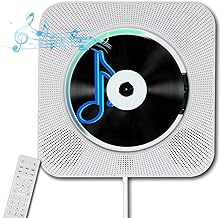
Best for: Buyers who want a wall-mountable CD player with built-in speakers and several ways to play audio. The feature list includes CD, CD-R, CD-RW, MP3, and WMA disc support, plus Bluetooth, FM radio, USB, SD card, and a 3.5 mm AUX connection.
The player can also act as a Bluetooth speaker for audio from a phone. Its listed accessories include wall-mounting hardware, a table stand, and a dust cover, giving buyers options for placement and storage. USB flash drives and SD cards up to 32GB are supported according to the product details.
iPod note: An AUX cable connection may be useful with a compatible device that has an audio output, but the listing does not identify a dock or confirm a particular iPod connection method. Check the iPod’s available output and required cable before buying.
Limitation: The feature list does not state that the player charges an iPod or supports a dock connector.
Jensen JMC-180A Vertical CD Player

Best for: Buyers who want a straightforward vertical-loading CD player with an auxiliary input and alarm functions. The listed features include CD-R/RW compatibility, stereo speakers, an AUX jack for smartphones, tablets, and other audio sources, and wake options for radio, alarm, or CD.
This model is a better fit for someone who values a simple CD-and-radio setup over a long list of digital playback modes. The AUX input may provide a wired route for audio from an iPod if the device and cable support it. However, the product details do not describe a built-in iPod dock, charging, Bluetooth, USB playback, or SD-card support.
Choose this if you want vertical CD loading and alarm choices without needing the broader feature set of the Homlab or Qoosea models.
Limitation: The supplied product information is brief, so confirm the mounting arrangement and desired connections on the product listing before purchase.
COOLGEEK M1 Transparent Wall CD Player

Best for: Buyers who want a wall-mounted display-style CD player and already have a compatible external speaker or headphones. Its transparent industrial design shows the disc, and the rechargeable battery is listed for up to eight hours of playback. It can be wall-mounted or placed on a desk.
The M1 has Bluetooth 5.0 and a 3.5 mm AUX output. The product description identifies Bluetooth as a transmitter function for Bluetooth speakers or headphones, and states that the unit has no built-in speakers. It also notes that it is not compatible with Sonos or smartphone/laptop Bluetooth inputs.
iPod note: The listing does not specify an iPod dock. Its Bluetooth and AUX output are not the same as a dock or an AUX input for playing an iPod through the CD player. Confirm the desired signal direction and connection before choosing this model.
Limitation: This is not a self-contained speaker system; external audio equipment is required to hear playback.
PROTKPETS Retro Desktop CD Player

Best for: Buyers who prefer a desktop player with a retro wood-grain appearance and built-in speakers rather than a wall-mounted unit. The listing describes dual speakers, Bluetooth 5.3 streaming from a phone or tablet, USB and AUX inputs, a headphone jack, a remote control, and a protective dust cover.
The rechargeable battery is stated to provide up to five hours of continuous CD playback. This makes the player relevant to buyers who want to move a desktop system between locations, although the listed product name and details do not describe wall-mounting hardware.
iPod note: No iPod dock is specified. The AUX input may be an option for compatible devices with an audio output, but the listing does not state which iPod models or cables work. Bluetooth is described for streaming from a phone or tablet.
Limitation: Choose another model if wall mounting is essential; the supplied details describe it as a desktop system.
Qoosea Wall-Mountable CD Player

Best for: Buyers seeking a wall-mountable player with built-in speakers and several playback functions. The listing identifies CD, CD-R, CD-RW, MP3, WMA, and WAV support, as well as FM radio, USB flash playback, Bluetooth receiver mode, an alarm clock, headphone jack, and 3.5 mm AUX input and output.
The player includes a compact stand and dust cover, so it can be placed on a surface or mounted on a wall. Its pull-switch design is another listed control feature. Bluetooth 4.2 receiver mode connects to devices such as phones or tablets; the product details specifically say it does not transmit Bluetooth audio to a Bluetooth speaker or headphone.
iPod note: No physical dock is listed. The AUX input may suit a compatible iPod with an appropriate audio cable, but the product information does not confirm iPod compatibility or charging.
Limitation: Do not choose it if you need Bluetooth transmission to wireless headphones or speakers; the listing says that function is not supported.
Buying Guide: How to Choose a Wall-Mounted CD Player
Does the player have a real iPod dock?
A wall-mountable CD player and an iPod dock are different features. A dock generally provides a physical connection designed for a device, while an AUX input accepts audio through a compatible cable. Bluetooth can send or receive audio, depending on the product. None of the five listings above explicitly confirms an iPod dock, so buyers who need a dock should look for a model that names the supported iPod connection and charging function.
Check the exact iPod generation and connector before ordering. Older and newer iPods may use different connectors or audio-output options. Do not assume a USB port will play or charge every iPod; the supplied product details do not establish that capability for these models.
Should you choose AUX, Bluetooth, or both?
An AUX input can be useful when a compatible iPod has an audio output and the correct cable is available. It is a wired connection, and the player’s listing should identify an input rather than only an output. Bluetooth is convenient for wireless playback, but the direction matters: a Bluetooth receiver plays audio sent from a phone to the player, while a transmitter sends the player’s audio to wireless headphones or speakers.
- For built-in speaker playback: Consider Homlab or Qoosea, both of which list built-in speakers and multiple playback modes.
- For a separate audio system: The COOLGEEK M1 requires external speakers or headphones and lists Bluetooth transmission and AUX output.
- For a basic wired source: The Jensen lists an AUX input, but its product details provide fewer connection specifics.
What should you check before wall mounting?
Confirm that the package includes mounting accessories and that the intended location has a suitable power arrangement. Homlab lists wall-mounting accessories as well as a table stand. Qoosea lists wall mounting and a compact stand. The M1 is described as wall-mountable and battery-powered. The Jensen name describes it as wall-mountable, but its supplied feature summary does not specify included mounting hardware. The PROTKPETS details focus on desktop use and do not list wall mounting.
Also consider how the disc is loaded and whether the chosen location leaves enough access for inserting CDs and operating controls. The product information here does not provide installation dimensions or wall-surface requirements, so consult the individual listing for those details.
Which extra playback features matter?
Choose features based on how the player will be used. FM radio and alarm options may matter in a bedroom or kitchen. USB or SD playback can be useful if you have music files stored on supported media. Disc-format support varies: Homlab lists CD, CD-R, CD-RW, MP3, and WMA discs, while Qoosea also lists WAV. Jensen lists CD-R/RW compatibility. Verify format and media limits for the exact model you plan to buy.
- Choose Homlab for a broad list of modes, including FM, USB, SD, Bluetooth, and built-in speakers.
- Choose Jensen for vertical CD loading, AUX input, and wake-to-CD, radio, or alarm features.
- Choose Qoosea for wall mounting, a stand, multiple listed disc formats, and an alarm-clock function.
- Choose M1 only if an external speaker or headphones are part of your setup.
How important are battery and portability?
Battery details are only provided for some products. The M1 lists a detachable rechargeable battery with up to eight hours of playback; PROTKPETS lists up to five hours of continuous CD playback. These are manufacturer-provided specifications, not a guarantee of runtime in every use. The Homlab, Jensen, and Qoosea details provided here do not state a battery runtime.
If you plan to keep a player mounted in one place, power access and mounting may matter more than battery capacity. If you expect to move it between rooms or use it away from an outlet, compare the stated battery information and confirm what is included with the product.
Frequently Asked Questions
Do any of these players include an iPod dock?
None of the supplied product descriptions explicitly identifies a built-in iPod dock. Check the listing for the exact iPod model, connector, and charging support if a physical dock is required.
Can I connect an iPod to a wall-mounted CD player with AUX?
Possibly, if the player has an AUX input and the iPod can provide audio through a compatible cable or adapter. The product information does not confirm compatibility with specific iPod generations, so verify the connection requirements first.
Which options have built-in speakers?
Homlab, Jensen, PROTKPETS, and Qoosea list built-in speakers. The COOLGEEK M1 explicitly has no built-in speakers and requires an external speaker or headphones.
Which player can send CD audio to Bluetooth headphones?
The COOLGEEK M1 lists Bluetooth transmitter functionality for Bluetooth speakers or headphones. The Qoosea listing says it does not transmit to Bluetooth speakers or headphones, and Homlab describes Bluetooth speaker-receiver use rather than transmission from the CD player.
Which model is best for a wall-mounted setup with several playback choices?
Homlab and Qoosea both list wall mounting, built-in speakers, and multiple playback modes. Compare their specific formats and connections against your needs, and remember that neither listing confirms an iPod dock.
Can a USB port replace an iPod dock?
Not necessarily. A USB port may support flash-drive playback, but the supplied descriptions do not confirm that these players use USB to play or charge an iPod. Look for explicit iPod support rather than assuming the port serves as a dock.