
The best choice depends on whether you want a speaker that docks or charges a phone, or a laptop docking station with WiFi-connected display information. The Selore is the clearest fit for a workstation that needs WiFi-synced weather and multiple ports; the induction speaker is best for a simple phone-stand setup. The other speaker stations combine Bluetooth audio with charging or lighting, while RayCue is a laptop dock rather than a speaker.
| Product | Best For | Key Distinction |
|---|---|---|
| Induction Speaker with Phone Stand | Basic phone audio and stand use | Induction-style speaker, RGB light, USB wired charging |
| Selore 17-in-1 Dock | Multi-monitor laptop workstations | WiFi-synced information display and extensive ports |
| Bluetooth Speaker Charging Station | Phone charging with hands-free audio | Bluetooth speaker and built-in microphone |
| 4-in-1 Bluetooth Speaker | Magnetic charging and bedside lighting | Speaker, phone stand, dimmable light |
| RayCue 14-in-1 Dock | Dual-monitor laptop setups | HDMI, USB, Ethernet, and shortcut buttons |
Induction Speaker With Phone Stand
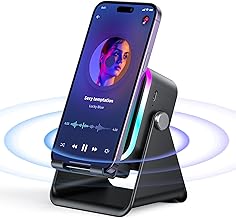
This compact 5-in-1-style device combines an induction speaker with a phone stand, RGB lighting, and USB wired charging. Its product title describes it as suitable for iPhone and Android phones, but does not specify model-by-model compatibility or detailed audio performance.
Best for: Buyers who want a phone stand and a simple speaker in one spot, such as on a desk or bedside table. It is a more direct match for a “speaker docking station” search than a conventional laptop dock because the device is designed around phone placement and audio.
Why it was selected: It combines phone support, sound, lighting, and wired charging in one product, reducing the need for separate desktop accessories.
Limitation: The listing information provided does not state battery life, speaker output, or whether the induction audio feature works with every phone case or placement. Check the product details for those specifics before buying.
Selore 17-in-1 WiFi Display Dock

The Selore is a laptop docking station, not a speaker. Its built-in WiFi syncs weather information to an LCD that also displays the date, time, and charging status. The dock connects to a laptop over USB-C and includes three HDMI ports, two DisplayPort connections, USB-A and USB-C ports, Gigabit Ethernet, SD and microSD card slots, and 100W PD input with up to 85W laptop output.
Best for: Windows laptop users building a multi-monitor workstation who also want a quick-glance information display. The listed MST configurations support three displays, with the first two running at up to 4K at 60Hz and the third at up to 4K at 30Hz.
Why it was selected: Among these options, it most directly matches the WiFi-and-docking-station part of the search. Its port range also suits people consolidating displays, wired networking, card readers, and peripherals.
Limitation: The listing says Mac systems mirror the same image across external displays rather than supporting three independent screens. The dock does not list an integrated speaker.
Bluetooth Speaker And Charging Station

This 4-in-1 station is described as a wireless charger, Bluetooth speaker, and docking station with a built-in microphone for hands-free calls. The product title names support for several iPhone generations and Samsung Galaxy S-series phones. It does not provide specific charging rates or detailed speaker specifications in the supplied information.
Best for: People who want a shared phone charging spot that can also play Bluetooth audio and handle hands-free calls. It is better suited to a phone-focused desk or nightstand than a multi-monitor computer workstation.
Why it was selected: It combines the two main functions suggested by “docking station speaker”—a place to dock or charge a phone and a speaker—with a microphone for calls.
Limitation: The listing information does not identify exact charging speeds or explain any device-specific charging requirements. Confirm that the charging method works with the phone and case you plan to use.
4-in-1 Magnetic Speaker And Light

This 4-in-1 product is described as a Bluetooth speaker with a 15W magnetic charger, dimmable light, and phone stand. Its title also specifies an N52 magnet. Those details make it a multifunctional phone station rather than a computer docking hub.
Best for: Buyers seeking a bedside or desk accessory that combines a phone holder, lighting, charging, and Bluetooth audio. Choose this if the magnetic charging feature and integrated light matter as much as the speaker function.
Why it was selected: It offers a distinct combination compared with the other phone-oriented products: a stated 15W magnetic charger and a dimmable light alongside the speaker and stand.
Limitation: The supplied product details do not specify which phones or cases work with its magnetic charging setup. Verify charging compatibility and requirements before purchase.
RayCue 14-in-1 Laptop Dock

The RayCue is a laptop docking station with two 4K HDMI ports, six USB ports, five shortcut buttons, and 1Gbps Ethernet. Its title describes it as a 14-in-1 dock for laptops from brands including Dell, HP, Lenovo, Asus, Acer, and Mac. The supplied product name notes that a power adapter is not included.
Best for: Laptop users who need a dual-monitor connection and a collection of wired ports in one hub. It is a better fit for workstation expansion than for someone specifically seeking a built-in speaker or WiFi display.
Why it was selected: It provides a second computer-dock comparison alongside the WiFi-enabled Selore, helping distinguish display and connectivity needs from phone-speaker needs.
Limitation: No speaker or WiFi feature is listed, and the product name says no power adapter is included. Check laptop compatibility and power requirements for the intended setup.
Buying Guide: How to Choose a WiFi Docking Station Speaker
Do you need a phone speaker dock or a laptop docking station?
These are different product categories. Phone speaker docks hold or charge a smartphone and play audio, often through Bluetooth or another stated audio method. Laptop docking stations add connections such as HDMI, USB, Ethernet, and card readers. The Selore adds a WiFi-synced information display, but it is not described as having a speaker. Decide which device you want to connect before comparing features.
What does WiFi mean in the product description?
For the Selore, WiFi is described as syncing weather data to the dock’s LCD. That does not mean the dock is a wireless speaker or that it replaces a wired Ethernet connection. If wireless audio is your priority, look for an explicitly stated Bluetooth or WiFi audio feature. The phone-oriented speaker products here name Bluetooth or induction-style audio, not WiFi audio.
How many monitors and ports do you need?
For multiple displays, compare the number and type of video outputs, supported display modes, and computer operating-system limitations. Selore lists multiple HDMI and DisplayPort outputs, but its three-independent-display support is specified for Windows MST and not for Mac. RayCue lists two HDMI outputs, but the supplied product data does not detail every operating-system display limitation. Check the full specifications for your exact laptop.
Also count the everyday accessories you plan to connect. USB devices, wired networking, memory cards, and laptop charging can determine whether a larger dock is useful. A phone speaker station is not a substitute for these workstation ports.
Will the charging feature work with your phone?
Product titles may identify a charging method or a list of phone families, but that does not guarantee compatibility with every model, case, or charging setup. The 4-in-1 magnetic speaker lists a 15W magnetic charger; the other phone station lists wireless charging without a rate in the supplied details. Check the manufacturer’s compatibility information, required power source, and case guidance before buying.
Do you need a microphone, light, or phone stand?
Prioritize features you will use regularly. A built-in microphone is useful when hands-free calls matter; a stand helps keep a phone visible; and a dimmable or RGB light adds a lighting function. These extras do not establish audio quality. Since the supplied details do not include comparable sound measurements, avoid choosing solely on assumptions about loudness or fidelity.
What should you verify before ordering?
- Confirm whether the product is for a phone, a laptop, or both.
- Check the exact phone or computer model and operating system against the full compatibility details.
- For laptop docks, verify video resolution, refresh rate, display mode, and power-delivery requirements.
- For speaker stations, verify audio connection method, charging method, and any case or placement restrictions.
- Check what accessories or power adapters are included; the RayCue product title says its power adapter is not included.
Frequently Asked Questions
Is the Selore docking station a WiFi speaker?
No speaker is listed. The provided details say its built-in WiFi syncs weather information to the LCD display. It is a laptop dock with display, USB, Ethernet, and card-reader connections.
Which product is best for a phone speaker and stand?
The induction speaker is the most direct option for a phone stand combined with speaker functionality. It also lists RGB lighting and USB wired charging. Confirm the audio and charging details for your phone before buying.
Which option includes a microphone for calls?
The Bluetooth speaker charging station is described as having a built-in microphone for hands-free calls. The supplied details do not specify microphone performance.
Can the Selore run three independent displays on a Mac?
The product information says no. It states that Mac external displays mirror the same screen, while three independent displays are not supported due to Apple chip limitations.
Does the RayCue include a speaker or power adapter?
No speaker is listed, and its product title says the power adapter is not included. It is described as a laptop dock with dual HDMI, USB ports, Ethernet, and shortcut buttons.
Is a phone docking speaker the same as a laptop dock?
No. A phone docking speaker focuses on phone placement, charging, and audio. A laptop dock expands computer connections for monitors and peripherals. Some products combine several functions, but buyers should verify each feature in the product specifications.