
The best WiFi mirror car adapter depends on whether you want wireless CarPlay, Android Auto, or phone-screen mirroring. Jemluse is best for iPhone users converting factory-wired CarPlay; LAMTTO adds listed video apps; HRpart combines wireless CarPlay with wired mirroring; the 4-in-1 adapter lists AirPlay and MirrorLink; and the mini 2-in-1 dongle suits households using both iPhone and Android. Check your vehicle’s existing infotainment support before buying: these adapters are not universal replacements for a car display.
| Adapter | Best suited for | Listed functions |
|---|---|---|
| Jemluse | Drivers with factory-wired CarPlay and an iPhone | Wireless CarPlay |
| LAMTTO | Drivers seeking wireless phone features and built-in video apps | CarPlay, Android Auto, video apps |
| HRpart | Drivers wanting CarPlay conversion and wired mirroring | Wireless CarPlay, wired screen mirroring |
| 4-in-1 adapter | Drivers seeking multiple connection and mirroring modes | CarPlay, Android Auto, AirPlay, MirrorLink |
| 2-in-1 mini dongle | Mixed iPhone and Android households | Wireless CarPlay and Android Auto |
Jemluse Wireless CarPlay Adapter
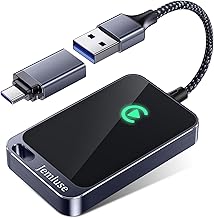
Best for: iPhone owners whose vehicles already support factory-wired Apple CarPlay and who want to connect without plugging in their phone each trip. The listing says the adapter is only compatible with wired Apple CarPlay systems, so that requirement should be checked first.
Jemluse lists 5.8 GHz Wi-Fi, Bluetooth 5.3, an eight-core processor, voice and touch control, and automatic connection. It is intended to bring familiar CarPlay functions such as navigation, music, calls, and Siri to the vehicle display while reducing cable clutter. Its aluminum-alloy construction is described as lightweight and designed to dissipate heat.
Why it was selected: The feature set focuses on converting an existing wired CarPlay setup to wireless, rather than claiming broad phone-screen mirroring. That makes its intended use relatively clear for eligible iPhone drivers.
Limitation: It does not list Android Auto or screen mirroring, and it will not serve a car that lacks factory-wired CarPlay.
LAMTTO Wireless Adapter With Video Apps

Best for: Drivers who want a wireless connection for supported CarPlay or Android Auto functions and are specifically looking for built-in video apps. The listing describes navigation, music, voice control, and video streaming features.
LAMTTO says the car must have factory-wired CarPlay or Android Auto, and its setup instructions include enabling Apple CarPlay in vehicle settings. The listing also describes a blue LED setting for Android Auto-only systems. It names services such as YouTube, Netflix, and TikTok, but app availability and operation can depend on the device and system setup.
Why it was selected: It addresses both cable-free phone integration and in-car video-app functionality, a different use case from adapters focused only on wireless CarPlay.
Limitation: The listing says it is not compatible with BMW or Tesla vehicles. Video content should be used only when the vehicle is safely parked, not while driving.
HRpart Adapter With Wired Screen Mirroring

Best for: Drivers who want to convert factory-wired CarPlay to wireless and also want the option to mirror supported phone content over a wired USB-C connection.
The listing says the adapter retains factory infotainment controls, including Siri, steering-wheel buttons, and vehicle controls, and reconnects automatically after initial setup. For screen mirroring, it describes using a USB-C connection to display compatible content such as navigation, presentations, and photos. It also says the phone can charge during mirroring.
Why it was selected: It clearly separates wireless CarPlay conversion from wired screen mirroring. That distinction is useful for buyers who want both functions but do not assume mirroring itself is wireless.
Limitation: The listing does not specify which phone models or vehicle models support every mirroring function. Confirm device and car compatibility before purchase.
4-in-1 Wireless Adapter With AirPlay

Best for: Buyers looking for a single adapter that lists wireless CarPlay, wireless Android Auto, AirPlay, and MirrorLink. The listing positions it as a multi-function option for phone integration and screen casting.
According to the product details, the adapter converts factory-wired CarPlay or wired Android Auto to wireless and supports AirPlay for iOS and MirrorLink for Android. It describes casting supported phone content, including videos and navigation, to the vehicle display. The listing also says original touchscreen and steering-wheel controls remain available after setup.
Why it was selected: Its four listed modes make it the broadest feature match for someone searching specifically for a WiFi mirror car adapter, rather than a wireless CarPlay dongle alone.
Limitation: It requires a factory-installed wired CarPlay or wired Android Auto system. Casting support can vary by phone, app, and vehicle display; verify the modes you intend to use.
2-in-1 Mini CarPlay and Android Auto Dongle

Best for: Households with both iPhones and Android phones that want wireless CarPlay or Android Auto from one adapter. The listing specifies iOS 10+ for CarPlay and Android 11+ for Android Auto.
The product description lists Bluetooth 5.4, Wi-Fi 6, automatic reconnection, and included USB-A and USB-C adapter cables. It says users can access navigation, music, calls, and messages through supported voice assistants, the touchscreen, or steering-wheel controls. The compact format may suit buyers who prefer a small dongle over a larger entertainment box.
Why it was selected: Its stated support for both phone platforms and two connector types makes it a practical comparison choice for mixed-device drivers.
Limitation: This is described as a wireless CarPlay and Android Auto adapter, not a screen-mirroring or video-streaming device. The listing’s vehicle-year range does not guarantee compatibility with every model in those years.
Buying Guide: How to Choose a WiFi Mirror Car Adapter
A WiFi car adapter can mean different things: a dongle that makes wired CarPlay or Android Auto wireless, or a device that mirrors a phone screen. Some products list both kinds of functions, but they may use different connection methods. Identify the feature you need before comparing wireless standards or accessory size.
Does your car have factory-wired CarPlay or Android Auto?
Start with the vehicle’s existing infotainment system. Most products in this selection depend on factory-wired CarPlay or Android Auto; they do not add a compatible system to a car that lacks one. Check the owner’s manual, vehicle settings, or automaker information. A USB port alone does not establish that a vehicle supports either phone-projection system.
Do you need wireless projection or screen mirroring?
Wireless CarPlay and Android Auto provide supported phone functions through the car interface. Screen mirroring is a separate capability that displays compatible phone content. Jemluse and the 2-in-1 mini dongle are presented as wireless projection adapters, while HRpart describes wired mirroring. The 4-in-1 model lists AirPlay and MirrorLink, and LAMTTO advertises video apps. Do not assume that a product offering wireless CarPlay also mirrors the entire phone screen.
Which phone platform and connection port do you use?
Choose based on the phones used by the regular drivers. Jemluse is described as an Apple CarPlay adapter, while the 2-in-1 and 4-in-1 options list both CarPlay and Android Auto. Check the stated operating-system requirements, connector type, and any included adapter cables. For mirroring, verify that the phone supports the specific method, such as AirPlay or MirrorLink, rather than relying on a general “screen mirroring” label.
What vehicle restrictions should you check?
Confirm the exact vehicle’s infotainment setup and any exclusions before ordering. LAMTTO specifically lists BMW and Tesla as incompatible. Other listings describe requirements such as factory-wired CarPlay or Android Auto but do not provide a complete vehicle-by-vehicle compatibility list. If your car is an unusual trim or model year, ask the seller to confirm support instead of assuming compatibility.
Do you want video apps in the vehicle?
Video features can be useful for passengers when a vehicle is parked, but they are not a reason to watch content while driving. Check whether the product offers built-in apps, casting, or mirroring; these are not identical functions. Also confirm that the specific app and phone can connect as expected. Follow local laws and keep the driver’s attention on the road.
Is setup and automatic reconnection important?
Most of these products are intended to reduce repeated cable connections, and several listings describe automatic reconnection after setup. The setup process still depends on enabling the right vehicle setting and pairing the phone. If multiple drivers use the car, check whether the adapter supports the phones and connection method each person needs. Jemluse specifically mentions multi-user connection, while the other listings describe their own pairing features.
Frequently Asked Questions
Will a WiFi car adapter work in any car?
No. The products here generally require factory-wired CarPlay or Android Auto. Check the adapter’s requirements against the specific vehicle’s infotainment system before buying.
Does wireless CarPlay automatically mirror every phone app?
No. Wireless CarPlay provides supported CarPlay functions; it does not necessarily duplicate the entire phone screen. Look for explicit AirPlay, MirrorLink, or screen-mirroring support if that is your goal.
Can I use these adapters with Android phones?
Some list Android Auto or Android mirroring, but not all do. Jemluse is described as compatible only with wired Apple CarPlay. Review the individual adapter’s operating-system requirements and supported modes.
Can I stream movies on a car display while driving?
Do not watch video while driving. If an adapter offers video apps or screen casting, use that functionality only when safely parked and in accordance with local laws.
What is the difference between AirPlay and MirrorLink?
AirPlay is listed here as the casting method for iOS, while MirrorLink is listed for Android on the 4-in-1 adapter. Actual support depends on the phone, adapter, apps, and vehicle display. Check the manufacturer’s compatibility details for your setup.