
Best Wired Single-Ear Headset Options for Clear Calls
Looking for a reliable wired single-ear headset for calls and virtual meetings? This guide highlights five top options designed for office work, remote learning, and gaming chat. Each pick targets different needs: comfort for long sessions, strong noise cancellation for noisy environments, and easy USB-A or USB-C connectivity for smooth setup. The list helps you choose based on value, compatibility, and daily-use scenarios.
| Product | Best For | Connectivity | Key Benefit |
|---|---|---|---|
| Poly Blackwire 3210 | All-day calls, office work | USB-C or USB-A | Dynamic EQ voice optimization |
| Logitech H570e | Microsoft UC environments | USB | Comfortable all-day wear |
| Jabra Evolve 20 (2026) | Home and office calls | USB-C/A | Crystal-clear calls with simple controls |
| Yealink UH35 | Open-office and remote work | USB-A | AI noise-canceling mic |
| Joso Wired One Ear Headset | Multi-device chat and gaming | USB-C & USB-A adapter | Cross-platform compatibility |
Poly Blackwire 3210 Wired Headset

The Poly Blackwire 3210 is a single-ear, wired headset with USB-C or USB-A connectivity. It features a noise-canceling microphone and dynamic EQ that adapts for voice calls and music listening. Inline controls provide quick access to answer/end, mute, and volume. This model is best for professionals who need reliable voice clarity in a solo-ear design and flexible connection options for Windows, Mac, or Teams environments.
- Best for: Office workers and students who want straightforward USB connectivity and clear voice pickup.
- Why chosen: Robust inline controls and adaptive audio make it a versatile pick for daily calls.
- Limitation: No wireless option or dual-ear coverage for complete ambient noise cancellation.
Logitech H570e Wired Headset Mono

The Logitech H570e Mono is designed for business use with strong compatibility with UC platforms. It offers a padded, adjustable headband and replaceable leatherette ear pads for extended wear. The headset is optimized for Microsoft Lync and similar platforms, making it a solid choice for enterprise environments where reliable audio input/output and durability matter.
- Best for: Professionals using Microsoft Teams, Skype for Business, or similar platforms who value comfort.
- Why chosen: Durable build and replaceable ear pads support long daily sessions.
- Limitation: Some users may prefer dual-ear models for better noise isolation in loud environments.
Jabra Evolve 20 (2026 Edition) Single-Ear

The Jabra Evolve 20 (2026) single-ear headset focuses on crystal-clear calls via a noise-canceling microphone and lightweight comfort. It supports USB-C and USB-A connectivity, with simple call and volume controls for easy management during meetings. This option suits users who need a lightweight, all-day headset compatible with multiple platforms.
- Best for: Contributors who want a compact, easy-to-use headset across platforms.
- Why chosen: Clear microphone performance paired with straightforward controls.
- Limitation: Being single-ear, it may offer less ambient awareness than some dual-ear designs.
Yealink UH35 Wired Headset (USB-A)
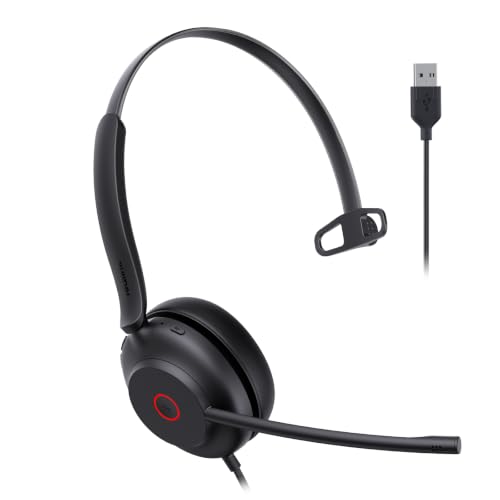
The Yealink UH35 USB-A headset emphasizes AI noise cancellation for improved voice pickup in open offices or busy home offices. It weighs about 3.4 oz and offers an adjustable headband with hydrolysis-resistant leather and memory foam cushions for extended comfort. Quick mute and volume controls streamline meeting management.
- Best for: Remote workers and customer service agents who need clear mic performance in noisy spaces.
- Why chosen: AI noise cancellation and lightweight design enhance daily usability.
- Limitation: USB-A only; might require adapters for newer devices with USB-C only ports.
Joso Wired One Ear Headset with Mic

The Joso wired one-ear headset supports cross-platform use, with USB-C and USB-A adapter options for PS5, PS4, Xbox, Switch, PC, Mac, and more. Inline controls place chat volume and mic mute at your fingertips, and a 40mm driver delivers game and chat audio. This model suits gamers and professionals who need broad device compatibility.
- Best for: Gamers and multi-device users who value broad compatibility.
- Why chosen: Flexible connections and convenient inline controls for quick mic adjustments.
- Limitation: May lack advanced noise cancellation found in dedicated mic systems.
Buying Guide
Key purchase considerations for wired single-ear headsets:
- Compatibility: Check USB-C or USB-A availability and whether multiple devices (PC, Mac, consoles) are required.
- Microphone quality: Look for noise canceling or AI-based mic tech if you work in busy spaces.
- Comfort and weight: Lightweight single-ear designs with cushioned ear pads are better for extended sessions.
- Durability and adjustability: Flexible headbands and replaceable pads help longevity in daily use.
- Controls: Inline or on-ear controls for mute, volume, and call management simplify meetings.
Frequently Asked Questions
- What is a wired single-ear headset best used for? – Ideal for when ambient awareness is needed and you want reliable voice pickup during calls and meetings.
- Do USB-C and USB-A versions offer the same features? – They offer similar core features, but compatibility with devices may vary; verify port availability before purchasing.
- Are single-ear headsets comfortable for long work sessions? – Yes, especially lighter models with cushioned pads and adjustable headbands.
- Can these headsets work with gaming consoles? – Some models provide cross-platform support via USB adapters; check device compatibility notes for each product.
- Is noise cancellation essential in a headset? – It helps in open environments but may add price; choose based on your typical work setting.
- Should I prioritize USB-C or USB-A? – USB-C is future-facing for newer devices; USB-A remains broadly compatible with many older systems.