
Best Wireless Audio From Computer to Receiver for Cable-Free Streaming
The best wireless audio-to-receiver solutions let you send high-quality audio (and video) from a computer to a display or sound system without tangled cables. This guide highlights five top options, explaining who each is best for and why. Ideal buyers include office presenters, home theater enthusiasts, gamers, and anyone seeking a clutter-free setup with reliable range and solid latency performance. The quick reference table below helps compare key details at a glance.
- Product: PWAYTEK Wireless HDMI Transmitter and Receiver
- Brand: PWAYTEK
- Best for: Large rooms and 4K-capable streaming from laptops or boxes
- Notes: Long range, plug-and-play; follow reset steps for long-term connection stability
| Product | Range | Resolution | Plug & Play | Best For |
|---|---|---|---|---|
| PWAYTEK | up to 100 m | 1080p/4K decode | Yes | Streaming to TV/monitor |
| Futureagle | up to 100 m | 4K decoding, 1080p | Yes | Presentations and home theater |
| 1Mii | up to 80 m | 1080p/Hi-Fi audio | Yes | Wireless audio to speakers |
| DRYMOKINI | up to 100 m | 4K decoding, 1080p | Yes | Phone/tablet mirroring to display |
| KVZOO | up to 100 m | 1080p | Yes | Meeting rooms and classrooms |
PWAYTEK Wireless HDMI Transmitter and Receiver Overview

This kit targets users who want a straightforward, cable-free way to mirror from a computer to a display with audio. It supports wireless 1080p video and audio transmission and can operate in a true wireless mode on newer laptops. It is best for home theater or small-to-medium conference spaces where a simple plug-and-play setup is valued. The main caveat is the need to follow the manual’s reset steps if long-term connection issues arise.
Futureagle Wireless HDMI Transmitter And Receiver

The Futureagle kit emphasizes long-range wireless performance with dual-band 5G/2.4G transmission, suitable for larger rooms, classrooms, or multi-device setups. It decodes 4K sources and outputs at 1080p 60Hz, making it a strong pick for high-definition video with minimal latency. Choose this if you need robust interference resistance and a broad operating area. It’s less ideal for ultra-low-latency gaming compared with dedicated gaming-focused adapters.
1Mii 2.4GHz Wireless Audio Transmitter Receiver Set
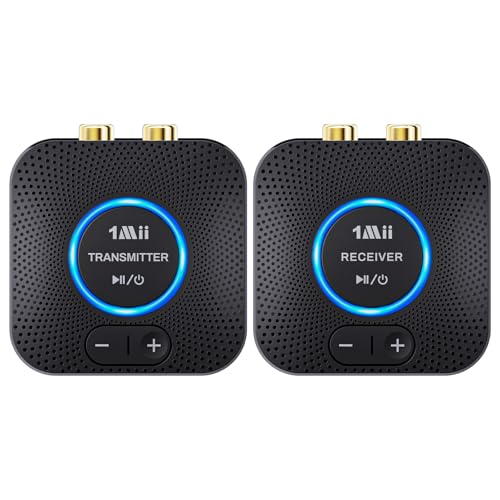
This set focuses on wireless audio distribution from a PC or TV to powered speakers or amplifiers. It offers dual AUX/RCA outputs for simultaneous connection to two speakers and uses 2.4GHz for a stable, cord-free experience. Best for home entertainment systems that prioritize high-fidelity audio with simple setup. Note that mixing simultaneous AUX and RCA outputs can cause audio channel confusion at the receiver end.
1Mii B06Pro Long Range Bluetooth Receiver

This Bluetooth-focused option extends wireless audio to home stereo systems without dedicated HDMI. It features Bluetooth 5.3, aptX Low Latency, and aptX HD, with up to about 60–197 feet range depending on line of sight and obstacles. Best for upgrading old stereos to wireless audio; not ideal for video transmission where lip-sync is critical. It may not support all video passthrough scenarios that HDMI-based extenders handle.
DRYMOKINI 2027 Upgrade Type-C Wireless HDMI Transmitter

The DRYMOKINI kit emphasizes Type-C devices and universal screen-mirroring with 4K decoding and 1080p 60Hz output. It supports a receiver-only mode for Miracast, DLNA, and AirPlay, making it a versatile option for meetings and classroom use. Best for users with USB-C sources seeking a quick, driver-free setup. A potential limitation is the need to ensure device compatibility with DP Alt Mode or HDMI adapters in some setups.
KVZOO 328FT Wireless HDMI Transmitter/Receiver Kit

The KVZOO kit highlights a 328-foot range with dual-band 2.4/5G transmission and a built-in LED status display. It supports 4K decoding with 1080p output and offers dual display capabilities for mirrors or extended displays. Best for meeting spaces, classrooms, and large living rooms where visibility and status feedback matter. A caveat is that users should verify compatibility with their specific HDMI sources and reception screens, especially in rooms with many walls or interference.
Buying Guide: Key Considerations For Wireless Audio From Computer To Receiver
What matters most depends on your setup. Consider range needs, device compatibility, and whether you require audio-only or full HDMI video and audio transmission. If you primarily need to extend audio to speakers, prioritizing a solid 2.4GHz/5GHz audio link with low latency helps. For videos and presentations, prefer devices that decode 4K or support 1080p at 60Hz with reliable sync.
- Resolution and latency: Look for 1080p/60Hz or 4K decoding and minimal lag for smooth video playback and lip-sync accuracy.
- Range and walls: Choose dual-band (2.4G/5G) and high-gain antennas if the space has walls or multiple rooms.
- Input/output options: Ensure the transmitter has HDMI (and if needed USB-C for Type-C devices) and that the receiver offers compatible audio outputs (AUX, RCA, or optical).
- Ease of setup: For simple use, a plug-and-play system with auto-pairing and clear reset steps reduces confusion during initial setup.
- Compatibility: Confirm that your source device supports the needed output (HDMI, DP Alt Mode, or USB-C) and that your display or speakers are compatible with the receiver’s outputs.
Frequently Asked Questions
- What is the main benefit of wireless HDMI across a home theater or office setup?
It eliminates most cabling, enabling flexible placement of devices while delivering both video and audio to a display or projector.
- Do wireless HDMI kits support 4K video?
Many do, with some models decoding 4K sources and outputting 1080p at 60Hz. Check the product specifications before purchasing.
- What should I consider for best audio quality?
Look for low-latency wireless audio with reliable RCA or AUX outputs and, if possible, a kit that supports audio passthrough with minimal compression.
- Is dual-band (2.4G/5G) always better?
Not always, but it helps in environments with interference. The best choice depends on your space and device compatibility.
- Can these systems work without Wi-Fi?
Yes. Most listed options are true plug-and-play systems that do not require Wi-Fi, Bluetooth, or apps for operation.
For buyers seeking a cable-free path from computer to receiver or display, these five options provide range, compatibility, and varied feature sets. Each is chosen for straightforward setup and clear signal delivery, helping you pick the right fit for your space and devices.