
The best wireless desktop microphone system depends on whether you need a single USB mic for a computer or several microphones for a meeting room. The MAONO PD100W is best for a cable-free gaming or creator desk, while the ZealSound K66 offers broad device-connection options. For shared spaces, the Phenyx Pro PTC-4 suits four-speaker discussions, and the XTUGA YT8 and Pyle systems are designed for eight-microphone setups.
| Product | Best For | Microphone Setup |
|---|---|---|
| MAONO PD100W | Gaming and creator desks | Single USB-C receiver mic |
| ZealSound K66 | Flexible computer and mobile recording | Single wireless USB mic |
| Phenyx Pro PTC-4 | Four-person meetings | Four gooseneck microphones |
| XTUGA YT8 | Eight-channel conference use | Eight desktop microphones |
| Pyle 8-Channel System | Events with an existing audio setup | Eight gooseneck microphones |
MAONO PD100W Wireless Dynamic Microphone

The MAONO PD100W is best for a solo user who wants a wireless desktop microphone for gaming, streaming, podcasting, or online meetings. Its listed features include 2.4 GHz wireless operation and a USB wired mode, giving users two connection options. The product is described as a dynamic microphone with a cardioid pickup pattern, a 30 mm capsule, and three selectable noise-reduction levels.
Choose this model if you want a desktop mic that can switch between wireless and wired USB use. Its foam windscreen and pop filter are intended to reduce breath sounds and plosives, while the noise-reduction setting lets users choose low, medium, or high processing for different rooms. The manufacturer lists computer, mobile phone, laptop, and PS5 use among its supported scenarios.
Limitation: The listed features say it is not compatible with Xbox consoles. iPhone use requires a separate Lightning receiver, so check the connection requirements before buying.
ZealSound K66 Wireless USB Microphone
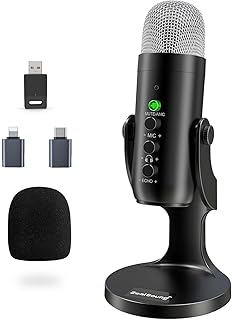
The ZealSound K66 is best for creators who want one wireless microphone for both a desktop setup and compatible mobile devices. Its listed features include 2.4 GHz wireless transmission, 48 kHz audio capture, a condenser capsule, and cardioid pickup. The manufacturer also lists onboard gain control, mute, echo, noise cancellation, and zero-latency monitoring.
Choose this mic if switching between computer recording and phone or tablet content creation is important. The product description says it includes Lightning-compatible and USB-C adapters and is designed for use with Windows PCs, Macs, laptops, PS4, PS5, iPhone, iPad, Android devices, and compatible tablets. It is also described as plug-and-play without requiring drivers or apps.
Gain control can help users adjust the microphone level for different speakers or distances. The listing positions it for podcasts, livestreams, gaming chat, interviews, voiceovers, and video narration.
Limitation: The listed compatibility is for specified devices and compatible tablets; verify that your particular device and recording setup support the included connection method.
Phenyx Pro PTC-4 Four-Mic System

The Phenyx Pro PTC-4 is best for a conference table, lecture setting, or discussion that needs four gooseneck microphones. Unlike a single USB desktop microphone, this is a multi-microphone UHF conference system with a receiver and four microphone units. Its listed features include four channels, 50 selectable frequencies per channel, and automatic frequency scanning.
Choose this system if several people need individual microphones and the installation includes audio equipment suitable for a receiver-based system. IR synchronization pairs the receiver and conference microphones, while a frequency lock can retain the selected frequency. The gooseneck microphones rotate 360 degrees and connect to their bases through a 4-pin XLR port.
The manufacturer lists a line-of-sight operating range of up to 328 feet and says the system can support operation of up to 12 conference microphones simultaneously through multiset operation. Its tuned EQ and foam windscreens are intended to support speech clarity in meeting and public-speaking environments.
Limitation: The product description specifies a receiver-based UHF system, not a direct USB computer microphone. Check the audio connections needed for your room before selecting it.
XTUGA YT8 Eight-Channel Conference System

The XTUGA YT8 is best for meetings or events where eight desktop microphones need individual channel controls. Its listed design has four LCD screens and eight knobs, with one knob for each channel. This layout is intended to let an operator adjust microphone levels directly rather than navigating menus.
Choose the YT8 if visible, hands-on control of multiple microphones is a priority. The system uses dual diversity antennas and PLL phase-lock transmission, and the product description lists an operating range of up to 230 feet. One-button IR synchronization is described as scanning for a frequency and pairing the microphones.
This setup is a better fit for a conference room, presentation, or group discussion than for a single-person computer desk. Its eight-channel configuration gives an operator separate level controls for individual microphones, which can be useful when speakers have different volume levels.
Limitation: The listing does not provide connection details for direct USB computer use. Confirm how its receiver connects to your speakers, mixer, or recording equipment before purchase.
Pyle Eight-Channel UHF Conference System

The Pyle eight-channel system is best for meetings, presentations, and events that need several gooseneck microphones and already have compatible audio equipment. The product listing describes eight channels, eight microphones, selectable frequencies, and a rack-mount receiver. It also includes a quarter-inch audio connection cable for connecting with speakers, amplifiers, or mixers.
Choose this model if your priority is a multi-microphone UHF system with an included connection cable for existing sound equipment. The listing specifies a 519–568 MHz frequency range, 8 x 100 selectable frequencies, unidirectional dynamic microphone cores, a 40 Hz–17 kHz dynamic range, and a 90 dB signal-to-noise ratio.
The manufacturer lists a range of more than 300 feet. These specifications make the system more appropriate for group speech and events than for a simple wireless USB mic attached to a personal computer.
Limitation: The listed connection is a quarter-inch audio cable, so this system is not described as a plug-and-play USB microphone. Check whether your audio equipment accepts the receiver’s output.
Buying Guide: How To Choose A Wireless Desktop Microphone System
Start by deciding whether “desktop system” means a microphone for one person at a computer or a conference system placed on a shared table. A USB wireless mic is generally the more direct option for an individual creator. Multi-channel UHF systems are designed to manage several microphones through a receiver and are usually selected for meeting rooms, presentations, or events.
Do You Need One Microphone Or Several?
For gaming, podcasting, livestreaming, and one-person calls, compare single-microphone options such as the MAONO PD100W and ZealSound K66. The MAONO listing highlights a dynamic capsule, wireless and wired USB modes, and adjustable noise reduction. The ZealSound listing emphasizes mobile adapters, gain control, monitoring, and additional sound controls.
For group discussion, compare channel count and microphone count. The Phenyx Pro PTC-4 provides four conference microphones, while the XTUGA YT8 and Pyle products are listed as eight-channel systems. More microphones can help give each participant a position at the table, but the system also requires a suitable receiver and audio setup.
Which Connection Type Fits Your Equipment?
Check the complete signal path before purchasing. A USB receiver is designed to connect a compatible computer or device, while a conference receiver may use an audio output that connects to a mixer, amplifier, or speaker system. The Pyle listing specifically mentions a quarter-inch cable for audio equipment. The Phenyx Pro listing describes an XLR connection between each gooseneck mic and its base, but that is not the same as a direct USB computer connection.
For mobile recording, verify the connector and adapter required by your phone or tablet. The ZealSound listing includes Lightning-compatible and USB-C adapters. The MAONO listing notes that iPhone use requires a separate Lightning receiver. Do not assume that every USB-C or Lightning device will work simply because an adapter is listed; check the product’s device requirements.
Should You Choose 2.4 GHz Wireless Or UHF?
The two single-mic products here use 2.4 GHz wireless connections. The conference systems use UHF and include receiver-based channel management. These are different wireless approaches, so compare the system’s intended use and the included receiver rather than treating the frequency labels as interchangeable. For either type, consider your room layout and the stated range, and remember that a listed range may depend on conditions such as line of sight.
For multi-microphone systems, frequency selection and synchronization features can simplify setup. The Phenyx Pro listing describes auto scanning, selectable frequencies, and IR sync. The XTUGA listing describes one-button IR synchronization. The Pyle listing includes selectable frequencies. These features are relevant when several wireless microphones are being used in one venue.
What Sound Controls Matter For Your Use?
For a solo voice, pickup pattern, gain adjustment, and noise processing can affect how the microphone handles the speaker and surrounding room. The MAONO PD100W lists cardioid pickup and three noise-reduction levels. The ZealSound K66 lists cardioid pickup, gain control, noise cancellation, and monitoring. These controls offer different ways to manage recording levels and background sound, but they do not replace choosing a suitable quiet recording location.
For meetings, individual channel controls are useful when speakers have different voice levels. The XTUGA YT8 provides eight knobs, one for each channel, according to its listing. For shared speech, also consider microphone placement, gooseneck adjustment, and whether the receiver can connect to the room’s sound system.
How Much Range And Room Coverage Do You Need?
Match the system to the distance between microphones, receiver, and speakers. The listed ranges vary: the Phenyx Pro system specifies up to 328 feet line of sight, the XTUGA specifies up to 230 feet, and the Pyle listing states more than 300 feet. These figures are manufacturer-listed specifications, not a guarantee of the same performance in every room.
A personal desktop mic typically serves a single speaker at a workstation, so the most important practical considerations may be device connection and placement. In a conference room or event space, check how far speakers may move and whether obstructions could affect the wireless link.
What Should You Confirm Before Ordering?
- Device support: Check the exact computer, phone, console, or tablet connection requirements.
- Included components: Confirm the listing includes the receiver, microphones, and adapters you need.
- Audio output: For a conference system, verify that your mixer, amplifier, or speaker accepts the receiver’s output.
- Microphone count: Match the number of microphone channels to the number of speakers who need separate mics.
- Operating environment: Consider room size, receiver placement, and possible wireless interference.
- Controls: Compare per-channel level knobs, gain control, mute, noise reduction, and monitoring based on your use.
Frequently Asked Questions
What Is The Best Wireless Desktop Microphone For One Person?
The MAONO PD100W is a strong match for a solo computer user who wants wireless and wired USB modes, while the ZealSound K66 is better suited to buyers who also want listed phone and tablet adapters and onboard gain and monitoring controls. Choose based on your device connections and preferred controls.
Can A Wireless Conference Microphone System Connect Directly To A Computer?
Not necessarily. The two conference systems listed here are receiver-based UHF systems, and their product details do not describe direct USB computer connections. Check the receiver’s audio output and your computer’s input options before buying.
Which Product Is Best For A Four-Person Meeting?
The Phenyx Pro PTC-4 is the listed option with four gooseneck microphones. It includes auto scanning, IR synchronization, and a receiver-based UHF design intended for meetings and public speaking.
Which Systems Have Eight Microphone Channels?
The XTUGA YT8 and Pyle systems are both listed as eight-channel options. The XTUGA highlights individual channel knobs and LCD screens, while the Pyle listing emphasizes selectable frequencies, a rack-mount receiver, and a quarter-inch audio cable.
Do Wireless Microphone Range Claims Guarantee Performance?
No. A listed maximum range is a manufacturer specification and can depend on the environment and line of sight. Compare the stated range with the room layout, and place the receiver where it has a clear connection to the microphones when possible.
Is 2.4 GHz The Same As UHF For Microphones?
No. The MAONO and ZealSound products are listed as 2.4 GHz wireless microphones, while the Phenyx Pro, XTUGA, and Pyle conference systems use UHF. They use different wireless designs, so confirm the included receiver and intended connection type for the setup you need.