
The best wireless PC speaker system depends on whether you want Bluetooth convenience, a dedicated subwoofer, or a simple wired desktop setup. The Bluedee 2.1 system is best for buyers seeking Bluetooth and multiple wired inputs with a subwoofer; the Creative Pebble V3 is better for a compact desk and Bluetooth 5.0. The OHAYO is a Bluetooth stereo option, while the Logitech and Amazon Basics systems are wired alternatives rather than wireless speakers.
| Product | Best For | Connection Notes |
|---|---|---|
| Bluedee 2.1 Computer Speakers | Bluetooth, several inputs, and a subwoofer | Bluetooth 5.4, USB, USB-C, AUX |
| Creative Pebble V3 | Compact desktop listening | Bluetooth 5.0 and USB-C audio |
| OHAYO 60W Speakers | Stereo sound and front-panel control | Bluetooth 5.3 listed |
| Logitech Z313 | Wired 2.1 audio with a control pod | Wireless connection not listed |
| Amazon Basics Stereo Speakers | Basic, USB-powered wired audio | 3.5mm AUX input and USB power |
Bluedee 2.1 Computer Speakers

Best for: PC users who want Bluetooth connectivity, several wired input choices, and a separate bass unit. This 2.1 system is listed with Bluetooth 5.4, USB, USB-C, and 3.5mm AUX connections, making it the most connection-flexible option in this group.
The manufacturer describes DSP tuning intended to provide balanced sound and reduce distortion and harsh highs. Its dedicated subwoofer handles low frequencies separately from the satellite speakers, which may suit movies, music, and games better than a basic two-speaker set. The system is adapter-powered, so it does not rely on a USB port alone for power.
Choose this if you want a hybrid setup that can connect wirelessly or by cable and you have room for a subwoofer. The listing states up to 80W peak power, which is not the same measurement as continuous output. Limitation: this is a larger, adapter-powered system, so it is less suited to a minimal desk or a setup that must run without a separate power adapter.
Creative Pebble V3 Desktop Speakers

Best for: Buyers who want compact speakers with both Bluetooth 5.0 and USB-C audio. The Pebble V3 uses two 2.25-inch full-range drivers and is designed to keep cabling simple when connected to a computer through USB-C. A USB-C-to-USB-A converter is included for older USB-A ports, according to the product details.
Creative lists 8W RMS output and peak power up to 16W. Its Clear Dialog processing is intended to make speech easier to hear in videos and shows without requiring the listener to raise the overall volume as much. A built-in gain switch can provide amplified audio when used with a 10W USB-C or USB-A port.
Choose this if desk space and clear spoken audio matter more than having a separate subwoofer. Bluetooth gives you a wireless listening option, while USB-C supports a direct computer connection. Limitation: the compact 2.0 design has no dedicated subwoofer, and the gain-switch feature depends on an adequately powered USB port.
OHAYO 60W Bluetooth Stereo Speakers
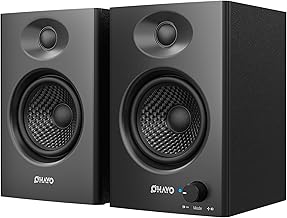
Best for: Desktop listeners who want Bluetooth 5.3 and a stereo pair with a front-accessible volume knob. The listing describes compact bookshelf-style speakers with a 0.75-inch tweeter, a 3-inch full-range driver, a rear bass port, and an MDF enclosure. Those details make this a different proposition from small USB-powered desktop speakers: it is a speaker pair intended to sit on a desk or shelf.
The product listing gives a 30W-per-channel description and says the rear bass port supports low-frequency output. It also lists an independent sound card. The front volume control can be useful when adjusting sound directly at the speakers rather than through a computer’s controls.
Choose this if you prefer a Bluetooth stereo pair and have space for speakers with a bookshelf-style form. The listing identifies the system as 2.0, despite also using “with subwoofer” wording in one feature description; the supplied details do not clearly establish that a separate subwoofer is included. Limitation: confirm the connection and included components in the current product listing before buying if a dedicated subwoofer or specific wired input is essential.
Logitech Z313 2.1 Speaker System

Best for: Buyers who want a conventional wired 2.1 PC speaker system, a compact subwoofer, and a separate control pod. Logitech lists 25 watts RMS output. The control pod provides a convenient way to adjust the system, while the subwoofer gives the setup a dedicated component for bass.
This product is included as a wired alternative for shoppers comparing wireless PC speakers with other desktop audio choices. A 2.1 layout may be more appropriate than a compact 2.0 pair for listeners who specifically want a separate bass unit. The product details provided do not list Bluetooth or another wireless connection.
Choose this if wired connectivity is acceptable and a control pod is more useful than wireless pairing. Limitation: do not choose it when Bluetooth is a requirement; the supplied features describe a control pod, 25W RMS output, and a compact subwoofer but do not specify wireless audio.
Amazon Basics Stereo 2.0 Speakers

Best for: Buyers who need a straightforward pair of wired speakers for a PC or laptop. The set uses USB power and a 3.5mm AUX input, with an in-line volume control for quick adjustments. This arrangement separates power from audio: USB supplies power, while AUX carries the sound signal.
The simple connection scheme may work well for a basic computer desk where Bluetooth is not needed. The two-speaker 2.0 format also avoids the extra space occupied by a separate subwoofer. Its in-line control keeps volume adjustment accessible without relying solely on the computer’s operating system.
Choose this if you want a basic wired stereo pair and prefer an uncomplicated setup. Limitation: the listed features do not include Bluetooth, so this is not a wireless audio system. It also has no dedicated subwoofer listed, which may matter to listeners seeking stronger separate bass output.
Buying Guide: How to Choose PC Speakers
Do you need Bluetooth or a completely wireless setup?
“Wireless PC speakers” usually refers to wireless audio transmission, not necessarily speakers that operate without cables. Bluetooth can send sound from a compatible computer without an audio cable, but speakers may still need a power cord or adapter. Check whether the product’s listing clearly identifies Bluetooth and how the speakers receive power.
Among these picks, the Bluedee lists Bluetooth 5.4, the OHAYO lists Bluetooth 5.3, and the Creative Pebble V3 lists Bluetooth 5.0. The Logitech Z313 and Amazon Basics speakers do not list Bluetooth in the supplied features. If wireless playback is essential, focus on the Bluetooth models and confirm your computer supports Bluetooth audio.
Should you choose 2.0 or 2.1 speakers?
A 2.0 system has two speakers and no separate subwoofer listed. It can be a practical choice when desk space is limited or when you want a simpler arrangement. Creative Pebble V3 and Amazon Basics are described as 2.0 systems; the OHAYO listing also identifies its speakers as stereo 2.0.
A 2.1 system adds a subwoofer for low frequencies. The Bluedee and Logitech Z313 are described as 2.1 systems. A subwoofer can add a dedicated bass component, but it also takes up space and needs to be positioned near the other equipment. Consider your room, desk layout, and listening preferences before choosing.
Which connection options should you check?
Match the speaker inputs to the devices you plan to use. USB-C can simplify a computer connection, while USB-A may be useful on older desktops. A 3.5mm AUX connection provides a familiar wired option, and Bluetooth can help reduce audio cabling. The Bluedee lists Bluetooth, USB, USB-C, and AUX; Creative lists Bluetooth and USB-C audio. The Amazon Basics pair uses USB for power and AUX for audio.
Do not assume that a USB cable always carries both power and audio. Product designs vary. Read the connection details and confirm whether an included adapter or a separate power connection is required. The Bluedee listing specifically describes an adapter-powered design, while Creative describes USB audio and notes that its gain switch requires a sufficiently powered USB port.
How much desk space do the speakers need?
Measure the available space for the speaker pair and, if applicable, a subwoofer. Compact desktop speakers can sit beside a monitor, while bookshelf-style speakers may require more width and clearance. A subwoofer needs a separate location, often beneath or beside the desk. Leave room for controls and cables so that adjusting volume or changing connections remains practical.
For a minimal desktop, the Creative Pebble V3 is described as a compact option. The Bluedee and Logitech systems include a subwoofer, and the OHAYO is presented as a small bookshelf-style pair. The Amazon Basics system has two speakers and no subwoofer listed.
What do the power ratings tell you?
Compare ratings only when the measurement types are clear. RMS and peak output are different specifications, so a peak figure should not be treated as continuous output. The Logitech Z313 lists 25W RMS, Creative lists 8W RMS and up to 16W peak, and the Bluedee listing gives 80W peak power. OHAYO describes 30W per channel. These figures alone do not establish which system will sound best in a particular room.
Speaker placement, room size, input source, and listening level also affect the experience. Use stated power figures as one comparison point rather than a complete measure of sound quality. For voice-heavy content, consider Creative’s listed Clear Dialog processing; for a dedicated bass component, compare the 2.1 systems.
Are easy controls important?
Consider where you want to change volume. The Logitech has a control pod, the Amazon Basics speakers have an in-line control, and the OHAYO listing specifies a front-panel volume knob. These controls can be convenient when the speakers are within reach. If you mostly adjust sound through your computer or phone, the physical control may be less important.
Also consider how many devices you will connect. Bluetooth and multiple wired inputs can make switching between sources easier, but the exact connection behavior depends on the product. Confirm the current listing’s input details rather than assuming that every connection can be active at once.
Frequently Asked Questions
Can I use Bluetooth speakers with a desktop PC?
Yes, if the PC supports Bluetooth audio and the speakers list Bluetooth connectivity. The Bluedee, Creative Pebble V3, and OHAYO products in this guide list Bluetooth. Check your computer’s Bluetooth settings and the speaker’s pairing instructions.
Are all five systems wireless?
No. The Bluedee, Creative Pebble V3, and OHAYO list Bluetooth. The Logitech Z313 and Amazon Basics speakers do not list wireless audio features in the supplied product details, so they are wired alternatives rather than wireless picks.
Does a Bluetooth speaker still need a power cable?
It may. Bluetooth describes how audio reaches the speaker; it does not necessarily describe how the speaker gets power. Check each product’s power requirements. The Bluedee listing specifically describes an adapter-powered design.
Is a 2.1 system better than a 2.0 system for PC use?
Not for every buyer. A 2.1 system includes a separate subwoofer and may suit listeners who want a dedicated bass component. A 2.0 pair can save space and simplify placement. Choose based on your desk, room, and preferred content.
Which option is best for a small desk?
The Creative Pebble V3 is the clearest compact-desk choice in this group because its product details emphasize compact speakers and USB-C connectivity. Still, check the speaker dimensions and cable arrangement in the current listing before ordering.
Which system has the most listed connection choices?
The Bluedee lists Bluetooth 5.4, USB, USB-C, and 3.5mm AUX. That makes it the most versatile option by the connections stated in the supplied product details. Confirm that its adapter-powered design suits your setup.