
The best wireless 2.1 PC speakers combine two satellite speakers, a dedicated subwoofer, and Bluetooth or another wireless connection. The Logitech Z407 is a strong fit for buyers who want wireless control and a subwoofer, while Nylavee and Bluedee offer Bluetooth alongside wired inputs. Logitech Z313 and Cyber Acoustics CA-3090 are 2.1 alternatives, but their listed features do not specify wireless connectivity.
| Product | Best For | Wireless Details |
|---|---|---|
| Logitech Z407 | Wireless control and multiple inputs | Bluetooth |
| Nylavee 2.1 | Bluetooth 5.4 and several connection choices | Bluetooth 5.4 |
| Bluedee 2.1 | Bluetooth plus USB, USB-C, and AUX | Bluetooth 5.4 |
| Logitech Z313 | Simple wired desktop audio | Not specified |
| Cyber Acoustics CA-3090 | Compact wired 2.1 setup | Not specified |
Logitech Z407 Bluetooth Speakers
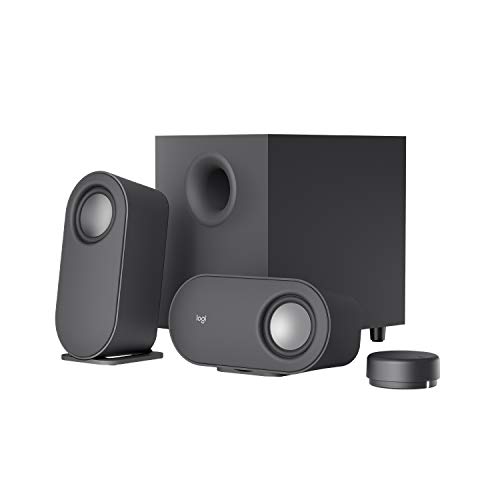
The Logitech Z407 is best for desktop users who want a 2.1 speaker system with Bluetooth and wireless sound control. Its listed features include 80 watts peak power and 40 watts RMS, a subwoofer with 20-watt bass, and a wireless control dial with a stated 30-meter line-of-sight range.
The system is designed to produce crisp high notes and clear mid- and low-range sound. Its ported, down-firing subwoofer adds bass for music, movies, and games. The control dial can adjust volume and bass and manage playback, making this a better fit for users who want to change sound settings without reaching for the speakers.
- Best for: Buyers who value wireless control and a dedicated subwoofer.
- Why it stands out: The listed feature set combines Bluetooth, multiple inputs, a wireless dial, and 2.1 audio.
- Consider: The system includes a subwoofer, so it requires more desk or floor space than a pair of compact stereo speakers.
Choose the Z407 if wireless control is a priority. Its listed 30-meter range is specified for line of sight, so it should not be treated as a guaranteed range through walls or other obstacles.
Nylavee Bluetooth 5.4 2.1 Speakers

Nylavee is best for buyers seeking a 2.1 desktop system with Bluetooth 5.4 and the option to connect by USB or AUX. The product listing describes 60 watts of peak power and a dedicated subwoofer intended to deliver deep bass for gaming, movies, and music.
Its three listed connection methods make it practical for setups that use different devices. Bluetooth supports wireless playback from compatible devices, while USB and AUX provide wired alternatives. For PC gaming, choose a wired connection if avoiding the possible delay associated with wireless playback is important; the listing specifically positions wired use for zero-latency gaming.
- Best for: People who want Bluetooth 5.4 but also need USB and AUX connections.
- Why it stands out: It combines a separate bass unit with three connection options.
- Consider: The stated 60-watt figure is peak power, not RMS power.
The product description promises clear mids and crisp highs, but those are manufacturer claims rather than independent measurements. Check the available connections on the intended computer or monitor before choosing between USB, AUX, and Bluetooth.
Bluedee Bluetooth 2.1 PC Speakers

Bluedee is best for buyers who want a 2.1 setup with Bluetooth 5.4 and a broad selection of wired inputs. The listed connections are Bluetooth, USB, USB-C, and 3.5mm AUX. Its product description also highlights built-in DSP tuning and a dedicated subwoofer for low frequencies.
The separate bass unit is intended to handle low notes while the satellite speakers reproduce the rest of the audio. The manufacturer describes the DSP tuning as a way to reduce distortion and harsh highs. This combination may suit everyday desktop use, including work, music, movies, and gaming, where wireless playback and wired fallback options are both useful.
- Best for: Buyers who need Bluetooth plus several wired connection types.
- Why it stands out: USB-C joins USB and AUX, giving users more connection choices than a Bluetooth-only system.
- Consider: The listed 80-watt figure is peak power; the provided information does not state an RMS rating.
The product is described as adapter-powered and plug-and-play. Confirm that the input you plan to use is supported by your device and that you have room for the subwoofer before buying.
Logitech Z313 2.1 Speaker System

The Logitech Z313 is best for buyers who want a straightforward 2.1 system with a compact subwoofer and simple control pod. Its listed features include 25 watts RMS output and a control pod for convenient operation. It is a relevant wired alternative for people who prioritize a subwoofer over wireless playback.
The compact subwoofer can add low-frequency sound to a desktop setup without choosing a larger bass unit. The control pod offers an accessible way to manage the system. However, the provided product details do not list Bluetooth or another wireless audio connection, so buyers looking specifically for wireless PC speakers should consider the Z407, Nylavee, or Bluedee instead.
- Best for: Users seeking a simple 2.1 system and compact subwoofer.
- Why it stands out: Its listed RMS output and included control pod provide clear, practical comparison points.
- Consider: Wireless connectivity is not specified in the provided features.
Choose this model if wired desktop audio meets your needs. Avoid it if Bluetooth playback is a requirement, unless you verify that the exact configuration you are considering supports it.
Cyber Acoustics CA-3090 2.1 Speakers

The Cyber Acoustics CA-3090 is best for buyers who want a basic 2.1 desktop system with separate controls for overall volume and bass. The listed system output is 18 watts peak and 9 watts RMS. It includes a ported, side-firing four-inch poly-carbon subwoofer and two-inch satellite drivers.
The control pod turns the speakers on and off and adjusts volume, while bass volume is controlled on the subwoofer. This makes the model suitable for someone who prefers simple physical adjustments. Its flat-panel speaker and subwoofer design may be useful when choosing equipment for a desktop, but buyers should still check the dimensions and available space for their arrangement.
- Best for: Users looking for an uncomplicated wired 2.1 speaker setup with separate bass control.
- Why it stands out: The listed driver and power details make its configuration easy to compare.
- Consider: Wireless connectivity is not specified, and its listed peak and RMS output are lower than those of some alternatives here.
Choose the CA-3090 when basic controls and a dedicated subwoofer matter more than Bluetooth. It is not the best match for a buyer whose main requirement is wireless audio.
Buying Guide: How To Choose Wireless 2.1 PC Speakers
Do you need Bluetooth or just a 2.1 speaker system?
A 2.1 system has two satellite speakers and a subwoofer, but the channel layout does not tell you whether the speakers connect wirelessly. Check the connection details separately. In this selection, Logitech Z407, Nylavee, and Bluedee list Bluetooth. Logitech Z313 and Cyber Acoustics CA-3090 are 2.1 options whose provided features do not specify wireless connectivity.
Bluetooth can reduce the number of audio cables between a computer and speakers. It is also useful for streaming from a phone or laptop. A wired connection may be preferable when you want to avoid Bluetooth pairing or possible audio delay. Nylavee specifically lists USB and AUX in addition to Bluetooth; Bluedee lists USB, USB-C, and AUX.
How important is the subwoofer?
A dedicated subwoofer handles low-frequency sound separately from the satellite speakers. It can add bass to music, films, and games, but it also takes up space. Before choosing a 2.1 system, decide whether there is room beside or beneath the desk for the bass unit and whether its placement suits your setup.
Compare the stated subwoofer details where available. Cyber Acoustics lists a four-inch side-firing subwoofer, while Logitech Z407 specifies a ported, down-firing subwoofer. Nylavee and Bluedee describe dedicated bass units, but the supplied features do not give their dimensions.
What should you know about power ratings?
Compare RMS power with RMS power and peak power with peak power. RMS describes a continuous power rating, while peak figures represent a different measurement and should not be treated as directly equivalent. Logitech Z313 lists 25 watts RMS; Cyber Acoustics CA-3090 lists 9 watts RMS and 18 watts peak. Nylavee lists 60 watts peak, Bluedee lists 80 watts peak, and Logitech Z407 lists 40 watts RMS and 80 watts peak.
Power ratings alone do not establish how a speaker will sound in a particular room. For a practical choice, consider your listening distance, room size, available placement, and whether you want stronger bass or a smaller desktop footprint.
Which connections should you check before buying?
Match the speaker inputs to the computer, monitor, or other device you intend to use. Bluetooth is convenient for wireless playback, while AUX can connect devices with a compatible 3.5mm output. USB and USB-C may suit certain desktop setups, but confirm the device and speaker support the same connection type. A system with multiple inputs gives you more ways to connect, but does not guarantee that every input is suitable for every device.
- Choose Logitech Z407 if Bluetooth, a wireless control dial, and stated RMS output are priorities.
- Choose Nylavee if Bluetooth 5.4, USB, and AUX are the key connection needs.
- Choose Bluedee if you want Bluetooth 5.4 and the listed USB, USB-C, and AUX choices.
- Consider Logitech Z313 or Cyber Acoustics if you want a 2.1 system and do not require wireless audio based on the supplied feature details.
Frequently Asked Questions
What does 2.1 mean in PC speakers?
A 2.1 speaker system has two satellite speakers and one subwoofer. The satellites handle much of the main audio, while the subwoofer is dedicated to low-frequency sound.
Are all 2.1 PC speakers wireless?
No. “2.1” describes the speaker configuration, not the connection method. Check the product features for Bluetooth or another wireless connection. In this selection, the Logitech Z407, Nylavee, and Bluedee list Bluetooth.
Which listed speakers have Bluetooth?
Logitech Z407 lists Bluetooth, while Nylavee and Bluedee list Bluetooth 5.4. The supplied features for Logitech Z313 and Cyber Acoustics CA-3090 do not specify Bluetooth.
Is Bluetooth or a wired connection better for PC gaming?
A wired connection is a practical choice when avoiding possible wireless audio delay is important. Nylavee’s product details specifically recommend its wired connection for zero-latency gaming. The best option depends on the device, connection, and gaming setup.
Should I compare peak power or RMS power?
Compare like with like. RMS and peak power are different ratings, so a peak figure should not be treated as equivalent to an RMS figure. Check the rating type as well as the number when comparing speaker systems.