
The Bobtot 5.1 system is the clearest fit for a home theater with wireless surround speakers, while Roku Wireless Speakers are best for compatible Roku devices. For events, the Bowens PA system offers Bluetooth and a wireless microphone, but its listing does not describe separate remote speakers. The two soundbars are simpler TV or computer audio options, not dedicated wireless speaker systems. Compare the connection types carefully: “wireless” can refer to audio streaming or satellite-speaker connections, which are not the same thing.
| Product | Best suited to | Wireless feature identified in the listing |
|---|---|---|
| Bobtot Wireless Surround Sound System | Home theater surround sound | Four wireless surround satellite speakers |
| Roku Wireless Speakers | Owners of compatible Roku equipment | Wireless setup with compatible Roku devices |
| Bowens Dual 8 Inch PA System | Portable sound and karaoke | Bluetooth and wireless microphone |
| Saiyin 11.7-inch Sound Bar | Compact TV, PC, or gaming audio | Bluetooth input; no remote satellite speakers listed |
| Detachable Sound Bar for Smart TV | Flexible TV, PC, or projector audio | Bluetooth input; no remote satellite speakers listed |
Bobtot Wireless Surround Sound System

Best for: Buyers who want a multi-speaker home theater arrangement and specifically need wireless surround satellites. The product listing identifies four wireless surround satellite speakers, making this the most directly relevant option here for placing speakers around a room without running audio wires to each satellite.
The system is described as offering 5.1- or 2.1-channel modes, an 8-inch subwoofer, and 1000W peak power. Listed connection options include ARC, optical, Bluetooth, and karaoke input. These details give buyers several possible ways to connect the system, though the listing does not establish which connection will work with every TV or device.
Why it was selected: Unlike products that only list Bluetooth audio, this one explicitly identifies wireless surround speakers. That distinction matters when the goal is sound from speakers positioned away from the main unit.
Limitation: The listing does not explain the wireless range, whether the satellites need power cords, or the exact setup requirements. Confirm those details before buying if speaker placement or cable reduction is a priority.
Roku Wireless Speakers, Set Of Two

Best for: People who already use compatible Roku TV, Streambar, or Streambar Pro equipment and want to add speakers to that setup. The product name describes a two-speaker set with easy wireless setup and premium audio for the compatible Roku devices listed.
These speakers should not be treated as universal wireless speakers. The listing specifically says they are compatible with Roku TV, Streambar, and Streambar Pro, and specifically excludes Roku SE. Buyers should check the exact model of their Roku device before choosing this pair.
Why it was selected: It offers a straightforward wireless-speaker option for buyers already within the stated Roku ecosystem. For that audience, avoiding a separate generic audio system may be more convenient than starting over with another setup.
Limitation: The listed compatibility is restricted. Choose another option if you need speakers to connect directly to a non-Roku television, receiver, or general-purpose audio source.
Bowens Dual 8-Inch Portable PA System

Best for: Event hosts, karaoke users, or DJs looking for a portable PA-style package with several playback and control features. The listing describes dual 8-inch speakers, Bluetooth, USB and SD inputs, an LCD, a remote, a wireless karaoke microphone, and stands.
This system is relevant when “remote speakers” means playing sound away from a phone or other Bluetooth source, or when a portable setup is needed for a gathering. However, Bluetooth playback does not by itself confirm that the two speakers connect to each other wirelessly or can be placed independently. The product title does not specify a wireless link between the speakers.
Why it was selected: It is the event-focused choice among these products. The microphone and playback options make it more suited to karaoke and portable sound than the TV-oriented systems in this list.
Limitation: Do not choose it solely to eliminate speaker-to-speaker cables unless the seller confirms how the speakers connect and what power or signal cables are required.
Saiyin 11.7-Inch Compact Sound Bar
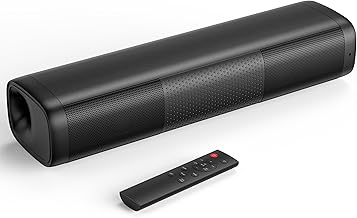
Best for: Buyers who want a small soundbar for a smart TV, PC, or gaming setup rather than separate remote speakers. At 11.7 inches, the listed design is compact, and the product name identifies Bluetooth 5.3, optical, and auxiliary inputs.
The soundbar is described as having 48W peak power and an AC adapter. Those details may help buyers compare its size and connection approach with larger home theater systems. Bluetooth provides a wireless way to send audio from a compatible source, but the listing does not say that this unit has wireless satellite speakers.
Why it was selected: It provides a compact alternative for people whose main goal is simple audio playback near a TV, computer, or gaming device. It may fit better than a surround system when space and simplicity matter more than room-wide speaker placement.
Limitation: This is a single soundbar-style product, not a listed multi-speaker remote-audio system. Avoid it if your core requirement is wireless speakers positioned around the room.
Detachable Sound Bar For TV And Gaming

Best for: People who want a soundbar for a TV, PC, gaming system, or projector and value the option to detach it. The listing names Bluetooth, ARC, optical, and AUX connections, plus auto volume boost and three equalizer modes.
The 2-in-1 detachable design is the feature that sets this option apart from the compact Saiyin soundbar. It may suit buyers who want flexibility in how the soundbar is arranged, but the available product information does not explain the exact detached configuration or confirm separate wireless speakers.
Why it was selected: It covers common TV and multimedia use cases and includes several named input types. For a buyer comparing basic audio upgrades, those listed connection choices may be useful when checking the ports on a source device.
Limitation: Bluetooth is listed as a connection, but wireless remote satellites are not. Choose a dedicated surround system instead if you need sound from speakers placed away from the soundbar.
Buying Guide: How To Choose A Wireless System For Remote Speakers
Start by defining what “wireless” means for your setup. Some products use Bluetooth to receive audio from a phone, tablet, or other source. Others, such as the Bobtot system in this list, explicitly describe wireless surround satellites. These features solve different problems: Bluetooth can remove a source-to-speaker audio cable, while wireless satellites address the connection between a central system and speakers around a room.
Do You Need Wireless Satellites Or Bluetooth Audio?
If you need speakers placed around a room, look for wording that explicitly identifies wireless satellite or surround speakers. Do not assume that a product with Bluetooth has wireless rear speakers. Bluetooth in a soundbar or PA system may only describe how audio reaches the main unit.
If you only need to play audio from a phone without a direct cable, Bluetooth may be enough. In that case, a compact soundbar or PA system could be more suitable than a multi-channel home theater system. Check which Bluetooth-enabled device sends audio and whether that meets your intended use.
Check Compatibility Before Choosing
Confirm the audio outputs on your television or source device and compare them with the product’s listed inputs. The products here name options including ARC, optical, auxiliary, and Bluetooth, but those connection labels alone do not guarantee compatibility with every device. For Roku Wireless Speakers, compatibility is specifically limited to the Roku equipment named in the product title, with Roku SE excluded.
For a TV system, identify whether you plan to use a wired connection such as ARC or optical, or stream audio over Bluetooth. For a computer or projector, verify that the source has a matching output. When a listing does not clarify a connection detail, check the seller’s setup instructions rather than assuming.
Consider Power, Placement, And Cables
“Wireless” does not necessarily mean a speaker can be placed anywhere without a power cord. A wireless speaker may still need power, and the product information provided here does not specify the power or cable requirements for every satellite. Ask whether each speaker needs its own outlet and what cables remain between the main unit, TV, and speakers.
Measure the intended locations before selecting a system. A compact soundbar may work well on a desk or in a limited space, while a surround system is intended for a different arrangement. For a PA setup, consider where the speakers and stands will go and whether the system can be powered at the event location.
Match The System To The Room And Use
- For home theater: Choose a system that explicitly lists surround satellites and the channels you want. The Bobtot listing identifies wireless satellites and 5.1/2.1 modes.
- For a compatible Roku setup: Consider the Roku pair only after checking that your specific device is supported.
- For karaoke or events: The Bowens PA listing includes a wireless microphone, Bluetooth, USB/SD playback, and stands.
- For a desk or small TV area: A compact soundbar may be simpler than a separate multi-speaker system.
Room size and layout affect where speakers can be placed and how practical a system will be. The product details supplied here do not provide measured coverage areas, wireless ranges, or room-size recommendations. Use those factors as questions to verify rather than relying on assumptions from a product’s power or channel claims.
Compare The Full Setup, Not Just The Word “Wireless”
Before buying, map the signal path: source device, main speaker or receiver, and any remote satellites. Determine which links are wireless and which still require cables. For instance, a Bluetooth soundbar may receive audio wirelessly while remaining a single unit near the TV. A system with wireless satellites may reduce audio wiring to those speakers but still require power and a connection to the TV.
Also consider the controls and inputs you need. The Bowens listing names an LCD and remote, while the soundbar listings identify different input types and audio modes. These features may influence day-to-day use, but they do not replace checking the essential requirements: speaker placement, source compatibility, power, and the exact wireless connection.
Frequently Asked Questions
What Is The Best Product Here For Wireless Surround Speakers?
The Bobtot Wireless Surround Sound System is the clearest match because its product title specifically lists four wireless surround satellite speakers. Confirm power, range, and setup requirements with the seller before choosing it.
Does Bluetooth Mean A Speaker Is A Wireless Satellite?
No. Bluetooth may describe audio streaming from a source device to the main speaker. It does not necessarily mean the system has separate wireless surround speakers.
Can Roku Wireless Speakers Connect To Any TV?
The listed compatibility is for Roku TV, Streambar, and Streambar Pro, and the title says Roku SE is not compatible. The product information does not describe universal connection to other TVs.
Are The Soundbars In This List Remote Speaker Systems?
No remote satellite speakers are identified in the Saiyin or detachable soundbar listings. They are described as soundbars with Bluetooth and other inputs, so they are better considered single-unit audio options.
Is The Bowens PA System A Wireless Speaker Pair?
The listing describes Bluetooth and a wireless karaoke microphone, but it does not specify that the two PA speakers link to each other wirelessly. Verify speaker-to-speaker connections and cable requirements before buying it for that purpose.
What Should I Verify Before Ordering A Wireless Speaker System?
Check source compatibility, the exact wireless connection type, wireless range, power requirements for each speaker, and any remaining cables. These details determine whether the system will work in the intended room or event space.