
The best XLR female-to-1/8-inch cable depends on the direction of the signal, the XLR connector gender, and whether you need a single mono microphone feed or a left-and-right stereo connection. The Disino 1.6-foot cable is suited to a short mono mic connection; Cable Matters is a camera-focused option; and the Disino Y-splitter is made for dual XLR outputs. Check your device’s input type before choosing.
| Product | Best For | Connection Style |
|---|---|---|
| Cable Matters Unbalanced Cable | Camera or computer mic input | 3.5mm to XLR, 6 feet |
| CableCreation 6-Foot Cord | Flexible professional-style cable | 3.5mm TRS to XLR, 6 feet |
| CableCreation Adapter Pair | Compact adapter needs | TRS female to XLR female |
| Disino 1.6-Foot Cable | Short mono mic connection | XLR female to 3.5mm TRS |
| Disino Dual-XLR Y-Splitter | Stereo left/right outputs | Two XLR female connectors to 3.5mm |
Cable Matters Unbalanced 3.5mm To XLR Cable
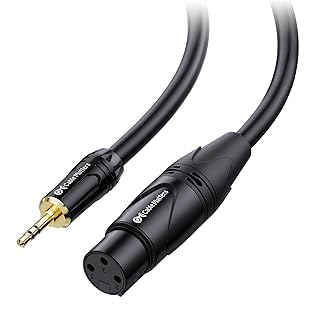
This six-foot unbalanced cable is intended to connect a microphone with an XLR connection to a camera, camcorder, or computer sound card with a 3.5mm microphone input. Its step-down 3.5mm connector is designed to fit recessed camera mic ports, which can be useful when the jack sits inside the device housing.
Best for: Buyers connecting a microphone to a compatible camera or computer input who want a six-foot cable. The listed oxygen-free copper conductors, copper braid shielding, and polyethylene insulation are features aimed at signal transmission and noise control.
Choose this if you need a camera-oriented connection and the device has a dedicated 3.5mm mic input. The product description also mentions powered microphones and feeding a mono signal across a phone-jack input for dual-mono output.
Limitation: This is an unbalanced connection, not a general-purpose balanced XLR cable. The product name also describes it as male-to-female, so confirm the XLR connector gender and signal direction shown for the item against your equipment before ordering.
CableCreation 3.5mm To XLR Female Cord

This six-foot CableCreation cord is described as an unbalanced 1/8-inch, 3.5mm-to-XLR female stereo microphone cable. Its listed construction includes professional-series XLR plugs, gold-plated connectors, a flexible PVC jacket, and a zinc-alloy housing with a black finish.
Best for: Buyers who need more reach than a short adapter provides and whose devices match the cable’s 3.5mm and XLR connector types. The six-foot length offers more placement flexibility for a camera or recording setup than a compact adapter.
Better for a straightforward cable connection than for combining separate left and right XLR outputs; the listing does not describe this as a dual-XLR Y-splitter. Check whether your source and destination require a mono mic feed, stereo signal, or a particular connector gender.
Limitation: The listing describes the cable as unbalanced, so it may not suit setups that require a balanced connection. Connector labels such as “stereo” do not, by themselves, guarantee compatibility with every XLR device or wiring arrangement.
CableCreation Compact XLR Adapter Pair

This listing includes two adapters described as 1/8-inch TRS female to three-pin XLR female. CableCreation identifies the adapters as unbalanced and says they are intended to connect XLR equipment to a 3.5mm device to output an unbalanced audio signal. The listed materials include a die-cast zinc-alloy shell and pure copper conductor.
Best for: Buyers who need compact adapters rather than a permanently attached cable, provided the female connector ends match their equipment. Having two adapters in the package may also be useful when matching multiple connections, but the listing does not specify a cable length because these are adapters.
Choose this if you want a small connector-based solution and have confirmed the signal direction and connector gender. It is a different format from the longer 3.5mm-to-XLR cables in this guide.
Limitation: Both listed ends are female, so this adapter may not connect directly to equipment with a female jack on either side. It is also specified for unbalanced audio, not balanced XLR signal paths.
Disino Short XLR Female To 3.5mm Cable

This 1.6-foot unbalanced cable has a three-pin XLR female connector and a 3.5mm TRS connector. The product is intended to connect a mono XLR microphone to the mini mic input on a camcorder, DSLR camera, or computer sound card. Its stated wiring feeds the mono microphone signal to both input channels.
Best for: Buyers who want a short cable for a nearby camera or computer mic input and need a mono mic signal on both channels. Its defined direction and short length make it a more specific choice than a longer general-purpose cord.
Important power note: The listing says a condenser microphone needs phantom power from the camcorder or a built-in battery supply in the microphone. Check the microphone’s power requirements and the recording device’s capabilities before connecting.
Limitation: The listing warns that this cable will not work directly with an iPhone or Android phone using a four-pole TRRS port; a suitable TRRS-to-TRS phone microphone adapter is needed. It also cautions against connecting to a speaker-output jack instead of a mic input.
Disino Dual-XLR To 3.5mm Y-Splitter

This 3.3-foot Y-splitter has two female XLR connectors and one 3.5mm mini-jack connector. It is designed to connect dual XLR left/right unbalanced line-level outputs to a device with a 3.5mm stereo audio input. The XLR ends are color-coded: blue for left and red for right.
Best for: Buyers who need to bring separate left and right XLR outputs into a stereo 3.5mm input. This is the most suitable choice in this list for a dual-output source because its two XLR branches are specifically described as left and right channels.
The cable’s listed construction includes 20 AWG oxygen-free copper, foil shielding, and a metal braid shield. Its split point is described as being closer to the XLR ends, with about 19.6 inches from the XLR connectors to that point.
Limitation: This is not the right choice for a single XLR microphone when you need a simple mono mic connection. The listing specifies dual, unbalanced line-level outputs, so verify that your source and destination match that use.
Buying Guide: How To Choose An XLR Female To 1/8-Inch Cable
Which connector goes into which device?
Start by identifying the output on your source and the input on your recording device. A cable described as XLR-to-3.5mm is not automatically interchangeable with one described as 3.5mm-to-XLR. Confirm which end is male or female, and check whether the product is intended to send audio in the direction your setup requires.
“1/8 inch” and “3.5mm” commonly describe the same general plug size, but plug size alone does not establish compatibility. Look at the connector type, such as TRS or TRRS, and the purpose of the jack. A microphone input, headphone output, and line input can behave differently even when they look similar.
Do you need one XLR connection or two?
For one mono microphone feeding a camera or computer mic input, choose a cable specifically described for a single XLR microphone and 3.5mm input. The short Disino cable is listed for that use and routes the mono signal to both input channels. For separate left and right XLR outputs feeding a stereo mini input, choose a dual-XLR Y-splitter such as the Disino model.
Do not assume a standard single XLR cable will combine two channels or create stereo. A Y-splitter designed for dual line-level outputs has a different purpose from a cable that connects one microphone. Match the cable’s stated wiring and use case to your source.
Should you choose a cable or an adapter?
A cable provides a length of wire between devices, which can help with positioning. Compare the listed lengths: the Cable Matters and CableCreation cords are six feet, the dual-XLR Disino splitter is 3.3 feet, and the short Disino mic cable is 1.6 feet. An adapter pair takes less space but provides little or no reach between equipment.
Measure the distance between the source and recording device before choosing. Allow enough slack for the setup without pulling on the connectors. If using an adapter, confirm that the connector genders at both ends match the ports and plugs you already have.
Does the cable need to carry balanced audio?
The products in this selection are described as unbalanced, or are specifically intended for unbalanced connections. A cable with an XLR-shaped connector is not necessarily a balanced cable. If your equipment requires a balanced signal path, verify the cable’s wiring and specifications rather than choosing based on connector appearance alone.
Unbalanced cables can be appropriate for short connections to camera or computer mic inputs when the product is designed for that purpose. For a setup with separate left and right outputs, make sure each channel reaches the correct input; the Disino Y-splitter marks its XLR branches blue for left and red for right.
Will it work with a phone or condenser microphone?
Check the phone’s port and the cable’s plug standard. The short Disino cable listing specifically warns that it does not work directly with phones that use a four-pole TRRS port and calls for a TRRS-to-TRS phone microphone adapter. Phone compatibility should not be assumed for other cables unless their product information confirms it.
For condenser microphones, check how the microphone receives power. The Disino cable listing says the camera must provide phantom power or the microphone must have a built-in battery supply. A cable alone does not establish that a device can power a microphone.
What should you verify before ordering?
- Confirm the source output, destination input, and intended signal direction.
- Check whether the XLR connection needs a male or female end.
- Determine whether you need a mono mic cable, a stereo cable, or a dual-channel splitter.
- Match TRS or TRRS requirements to the device’s jack.
- Check microphone power needs, especially for condenser microphones.
- Choose a cable length that suits the physical distance between devices.
Frequently Asked Questions
Is a 1/8-inch connector the same as a 3.5mm connector?
They are commonly used to describe the same general plug size. However, confirm whether the device requires TRS or TRRS and whether the jack is for a microphone, headphones, or another audio connection.
Can I connect an XLR microphone directly to a camera with these cables?
Some products in this list are described for connecting an XLR microphone to a camera’s 3.5mm mic input. Confirm the exact cable direction, connector gender, and camera input type before use.
Will an XLR-to-3.5mm cable provide phantom power?
Do not assume it will. The cable listing for the short Disino model says the camera must provide phantom power or the microphone must have its own built-in battery supply.
Can I use a regular 3.5mm TRS cable with a phone’s TRRS port?
Not necessarily. The Disino short-cable listing warns that a four-pole TRRS phone port needs a suitable TRRS-to-TRS microphone adapter for that cable.
Which product is intended for two XLR output channels?
The Disino dual-XLR Y-splitter is specifically described for separate left and right unbalanced line-level XLR outputs feeding a 3.5mm stereo input. Its blue connector is marked left, and its red connector is marked right.