
What a Speaker Crossover Does and How to Set It
A speaker’s internal crossover and a receiver’s subwoofer crossover are different parts of the system. Identify which one you’re looking at before changing a frequency setting.
In this guide
- Separate the two jobs called crossover
- What happens inside a multi-driver speaker?
- What the receiver's crossover setting changes
- Start with the manual or the system's setup result
- Read Small, Large, and Full Range as settings
- Check whether the subwoofer adds another filter
- Listen for a useful transition, not the biggest bass note
- Keep a short record of which device handles each job
Separate the two jobs called crossover 1 3
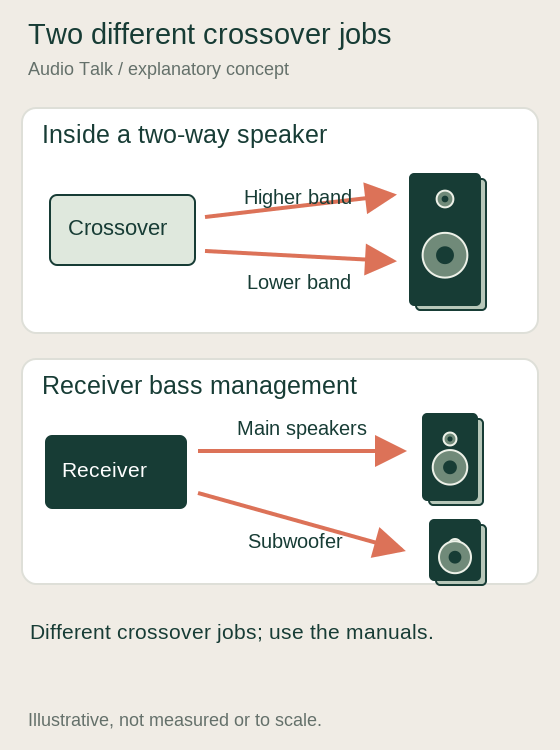
A crossover divides audio into frequency ranges so different parts of a system can handle different jobs. Inside a conventional multi-driver speaker, it helps distribute sound between drivers; in an AV receiver, a crossover setting can direct lower frequencies toward a subwoofer.
Those aren't the same adjustment, even though both descriptions use the word crossover. A specification listing a speaker's internal crossover frequency isn't automatically the number you should enter into the receiver's bass-management menu.
Before changing anything, identify the device, menu, and setting name you're looking at. A photograph of the screen and a note of the current value give you a useful baseline, especially when several devices in the system offer their own filters.
What happens inside a multi-driver speaker? 1 2
A speaker can use a woofer for lower frequencies and a tweeter for higher frequencies, with a crossover arranging how those drivers contribute. KEF's Reference white paper describes passive crossover filters working on the signal supplied by the external amplifier.
In an active design, the division can happen before separate amplifiers drive the relevant units. Genelec documents that arrangement for its active loudspeakers, which is another reason not to assume every product uses the same internal circuit just because it has two visible drivers.
The internal crossover is part of the loudspeaker's design, rather than a universal user preference setting. Unless the manufacturer provides an adjustment and instructions, you shouldn't open the cabinet or try to modify components to match a receiver-menu value.
Use that specification to understand the product, then move on to the setup controls your equipment actually exposes. Knowing which drivers divide the work is useful context, but it doesn't replace the speaker's stated placement and connection instructions.
What the receiver's crossover setting changes 3
Denon's AVR-X1800H manual describes its crossover as the point used to send lower-frequency sound to the subwoofer. It also tells users to consider the speaker's lower-frequency capability, which connects the setting to the actual speaker rather than its physical size alone.
The main speaker and subwoofer don't hand sound to each other at a perfectly sharp wall. Filters work across a transition region, so the selected number is a setting in the system rather than a promise that one cabinet stops instantly and another begins instantly.
A useful mental picture is two overlapping responsibilities: the main speaker handles its part while bass management assigns lower-frequency work elsewhere. Keep that separate from the much higher-frequency division between a woofer and tweeter inside a typical two-way speaker.
Read your receiver's manual to see which speakers the setting applies to and what happens when no subwoofer is configured. The available choices and routing can differ by model, so a menu on another receiver isn't a reliable substitute for your own instructions.
Start with the manual or the system's setup result 3
Use the manufacturer's setup guidance and any properly completed automatic calibration as your starting point. Record those results before experimenting, so you can compare a change without losing the configuration that the system established for your actual equipment.
Denon lists an 80 Hz default in the cited AVR-X1800H manual, but that isn't a universal optimum for every speaker. Its instructions also explain using a higher setting when a small speaker's usable range requires it, which shows why the exact model matters.
Don't choose a lower number simply because it seems more impressive. The practical question is whether the main speakers and subwoofer can share the work cleanly at the levels you use, with the routing and limits specified for the system.
If the speaker documentation gives a recommended crossover for use with a subwoofer, compare it with the receiver's instructions. When information is missing or conflicting, ask support using the model names rather than guessing from cabinet dimensions or a marketing frequency-range headline.
Read Small, Large, and Full Range as settings
Some receivers use Small and Large labels, while others use Full Range or different wording to describe bass handling. Those labels are setup choices, so don't assume a tall floorstanding cabinet must always use a setting that sends it the full signal.
Likewise, a compact speaker isn't automatically configured correctly just because the menu says Small. The crossover, subwoofer presence, and output routing still need to match the manufacturer's instructions and the speakers actually connected.
Check the current manual before following an older online guide, since terminology can change between models and versions. Denon's cited X1800H page uses Full Range and explains how the front-speaker setting changes when the subwoofer is set to No.
Write down what your menu label does in the actual system rather than memorizing a label as a rule. “Lower bass is redirected to the subwoofer here” is much more useful during troubleshooting than “all big speakers are Large.”
Check whether the subwoofer adds another filter
Many powered subwoofers have their own low-pass control or a documented bypass mode for receiver-managed setups. Read the subwoofer and receiver instructions together so you know which device is intended to manage the crossover in your chosen connection.
Don't adjust both filters blindly to the same number and assume that makes the transition more accurate. Two active filters can combine, so the correct arrangement needs the equipment's documented procedure rather than a guess based on the positions of two knobs.
Also distinguish a speaker crossover from a receiver setting labeled LPF for LFE or Low Pass Filter for the LFE channel. The LFE signal and redirected bass are related parts of home-theater bass routing, but the labels can refer to different controls and purposes.
If your device offers several similarly named settings, use the manual's definitions before touching them. Capture the baseline and change only the control you can explain, leaving other values alone until you have a specific reason to investigate them.
Listen for a useful transition, not the biggest bass note
After making one permitted adjustment, replay a familiar passage with changing bass notes and clear voices. Listen from the main seat and compare the overall balance, keeping the volume and other settings consistent with the baseline.
Check the neighboring seat if other people use the system, and include a quieter recording in the comparison. A setting that creates a dramatic effect on one passage might be less useful across ordinary music and television.
If a note disappears or the balance becomes uneven, consider placement and routing as well as the crossover. Turning a frequency setting up and down won't necessarily solve a room-related problem or a subwoofer that isn't receiving the intended signal.
Return to the saved baseline when you can't identify a clear improvement. An informal listening experiment is allowed to end with the original setting, especially when the system already works comfortably at your normal playback level.
Keep a short record of which device handles each job
Your final notes should name the receiver crossover, any subwoofer filter or bypass setting, and the speaker configuration. Include the date and the reason for a change so the values remain understandable after you reconnect or replace equipment.
Leave the loudspeaker's internal crossover specification in a separate note if you're comparing designs. That small separation helps prevent you from accidentally copying a driver-to-driver frequency into a bass-management setting later.
If you need help, send the manufacturers a simple connection sketch and the exact menu labels or photographs. They can address a defined routing question more effectively than a request for a crossover number with no system details.
Once you know which crossover you're looking at, the setup becomes much easier to explain. Start from the documented arrangement, make a controlled comparison when needed, and keep the setting that serves your speakers, subwoofer, and room.
Sources & how this guide was prepared
Audio Talk Editorial checked these primary sources on October 14, 2026. This is a research-based guide with original practical examples; it does not report our own equipment tests.
- KEF Reference white paper: crossover design
- Genelec: optimized amplifiers
- Denon AVR-X1800H: crossovers
Manufacturer instructions for your exact model take priority. Read our editorial method · Photo and illustration credits