Best Gaming Earbuds for PC: Top Picks for Competitive Play
Answering your search for PC‑oriented gaming earbuds, this guide highlights five models that balance sound clarity, comfort, and latency. Each pick suits a different gamer profile—from competitive shooters to casual stream watchers. Below is a quick summary table of the selected products to help you compare at a glance.
| Product | Best For | Key Benefit | Limit |
|---|---|---|---|
| Linsoul KZ ZS10 Pro | Gamers seeking detailed highs | Hybrid 4BA+1DD for bright, dynamic sound | Without mic |
| HyperX Cloud Earbuds II | Travel-friendly gaming | 14mm drivers and solid case for portability | Non‑audiophile tuning |
| Yeabomy AK3FILE | Noise isolation & comfortable wear | 1DD + 10mm dynamic for strong bass | Signal cable may feel stiff |
| Razer Hammerhead V3 X | Multiplatform wireless freedom | 2.4 GHz + Bluetooth 5.3 with long battery life | Wireless latency can vary by device |
| AOC ACT3512 | 2.4 GHz gaming with low latency | 20 ms ultra-low latency and built‑in amplifier | Note: Not Xbox compatible |
How to choose quickly: pick the KZ ZS10 Pro if you want bright, detailed highs; HyperX Cloud Earbuds II for portable gaming on the go; Yeabomy AK3FILE for noise isolation and comfort; Razer Hammerhead V3 X for wireless, cross‑platform play; or AOC ACT3512 for low latency PC gaming with an amplifier. The buying guide below expands on these considerations to help you decide.
Linsoul KZ ZS10 Pro — 4BA+1DD Hybrid IEM

The Linsoul KZ ZS10 Pro uses a 4 balanced armature plus 1 dynamic driver arrangement to deliver bright, fast highs and present mids with clarity. The dual‑material faceplate combines stainless steel with resin for durability and style. This model is best for players who value detailed treble and a lively sound signature, particularly in fast-paced shooters or rhythm games. The detachable gold‑plated cable makes upgrades easy, though the model shown is without a built‑in microphone, so it’s not ideal for in‑game voice chat on its own. For PC gaming, pairing with a separate mic can be an option.
- Best for players who want crisp highs and precise sound cues
- Better for those who don’t require a built‑in mic
- Limit: No integrated microphone; needs external mic for chat
HyperX Cloud Earbuds II — 14mm Drivers

HyperX Cloud Earbuds II are designed for versatility and portability. The 14mm drivers deliver immersive sound suitable for gaming on the go, and the included carrying case helps protect the pair during travel. This option is well suited for gamers who split time between a PC desk and a mobile setup, or those who want a straightforward, reliable fit with multiple tip sizes for comfort. The model’s emphasis on portability make it a practical pick for LANs or commuting sessions. A built‑in microphone is present, but the focus remains on broad compatibility and comfortable wear.
- Best for: gamers who need portability and a reliable fit
- Better for: users who prefer a simple, plug‑and‑play experience
- Limit: Tuning is more neutral than “hyper‑competitive” audio curves
Yeabomy AK3FILE Wired Gaming Earbuds

Yeabomy AK3FILE emphasizes comfort and stable fit with memory wire and an ergonomic shell. The single dynamic driver plus the quiet, low‑noise profile aims to deliver robust bass and clear mids, which can help with in‑game cues and voice chat quality when used with a compatible mic. The adjustable no‑noise isolation helps players stay immersed during long sessions. Users should note that the cable feel may be stiffer, which can affect wear over extended gaming marathons.
- Best for: gamers who value a secure fit and strong bass response
- Better for: longer sessions where comfort matters
- Limit: Cable stiffness may affect long‑term comfort
Razer Hammerhead V3 X — Wireless
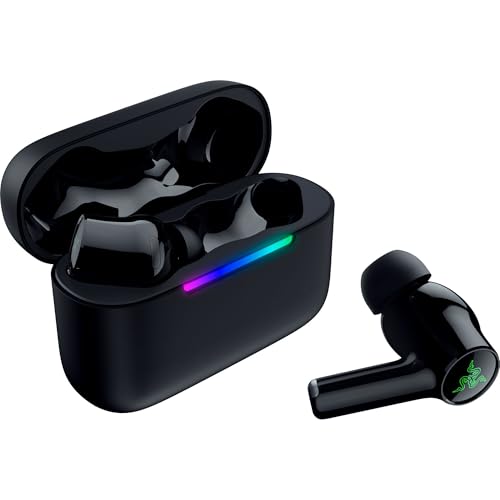
This Razer model offers a dual‑mode wireless experience with 2.4 GHz HyperSpeed Wireless for low latency on PCs and Bluetooth 5.3 for everyday listening. It is designed for a broad range of devices, including smartphones, Nintendo Switch, and PC platforms. The multi‑platform versatility makes it a strong choice for players who switch between devices without swapping gear. Battery life reaches up to 35 hours when including the charging case, which is beneficial for long gaming sessions or travel. Latency can differ based on the device and wireless environment.
- Best for: gamers who need wireless freedom across platforms
- Better for: those who want long battery life and cross‑device use
- Limit: Wireless latency varies by device; not ideal for ultra‑competitive esports
AOC ACT3512 Wireless Gaming Earbuds

AOC ACT3512 combines 2.4 GHz and Bluetooth 5.3 for flexible connectivity with PC and Nintendo Switch gaming. It emphasizes ultra‑low latency on the 2.4 GHz mode and includes a built‑in amplifier to enhance highs and lows. This makes it a good pick for players who want tight audio‑video synchronization in competitive titles while also using the earbuds for everyday listening. Note that the product may not be compatible with Xbox consoles, depending on the dongle support and firmware.
- Best for: players who want real‑time audio sync on PC and Switch
- Better for: users needing a built‑in amplifier for crisper highs
- Limit: Not Xbox compatible
Buying Guide: What to Consider Before Buying PC Gaming Earbuds
Latency matters. Look for models that advertise low latency via 2.4 GHz wireless or wired connections with minimal delay. If you rely on chat, a built‑in microphone or a separate, reliable mic should be part of the package. Comfort and fit determine session length, so choose memory wire or soft cups for long gaming marathons. Driver size and configuration influence bass, mids, and treble; hybrids often offer broader tuning ranges, which helps across genres. Portability is a plus for LANs or travel, while wireless options provide freedom but may introduce occasional pairing quirks. Check compatibility with your PC, console, or mobile device before purchasing.
FAQ
- What is the main difference between wired and wireless PC gaming earbuds? Wired models typically have lower latency and fewer dropouts, while wireless options offer more freedom of movement and multi‑device use.
- Do I need a built‑in mic for PC gaming? If you rely on in‑game voice chat, choose a model with a built‑in mic or plan to use an external mic.
- Is a larger driver always better for gaming sound? Not always; driver type and tuning matter more for clarity, balance, and response in your preferred genres.
- Can I use gaming earbuds for console gaming as well? Many support PC and Switch via USB‑C dongles or Bluetooth; check compatibility with your console before buying.
- What should I avoid if I want the best bass? Prioritize earbuds with dedicated dynamic drivers for bass extension and ensure the build accommodates comfortable wear without causing fatigue.
- Are there latency differences between 2.4 GHz and Bluetooth modes? Yes; 2.4 GHz generally offers lower latency than Bluetooth, which is important for fast‑paced games.