
Best HDMI to 7.1 Analog Audio Converters for Home Theaters
Answering the common need for bridge-like audio connections, this guide highlights top HDMI to analog audio converters that support 7.1 or multi-channel setups. Ideal for people with legacy amps, soundbars, or headphones seeking high-quality PCM/LPCM output from modern HDMI sources. The top picks are suited for different TV brands, audio formats, and output preferences, helping you pick the best match for your system.
Overview of selected products: the list below focuses on devices that convert HDMI ARC/eARC to analog outputs (3.5mm and RCA) or provide multiple digital/analog outputs, enabling flexible integration with older receivers, stereo systems, or custom home theaters. The table summarizes key capabilities to compare at a glance.
| Product | Best For | Key Output Options |
|---|---|---|
| OREI HDMI ARC/eARC to Analog Audio Extractor Converter | TV owners with ARC/eARC seeking basic 2-channel output | 3.5mm AUX, RCA L/R (simultaneous) |
| Tendak 192KHz HDMI eARC/ARC Audio Extractor | Older amplifiers or speakers needing flexible ports | HDMI, optical, RCA L/R, 3.5mm (multiple outputs) |
| XPTSFDU 3 in 1 HDMI ARC to RCA Audio Converter | Multi-input flexibility with ARC, Toslink, and coaxial | RCA, optical, coaxial, 3.5mm AUX |
| YAODEMA HDMI eARC/ARC Audio Extractor, 4K@120Hz | 4K/120Hz sources needing clean audio extraction | HDMI out, Toslink, Coaxial, 3.5mm |
| AllAboutAdapters 4K HDMI to Optical + LPCM>Decoder | Uncompressed LPCM to analog/optical with multi-channel routing | Optical, RCA, 3.5mm (analog) outputs |
OREI HDMI ARC/eARC to Analog Audio Extractor Converter

This device converts HDMI ARC/eARC signals from a TV into 3.5mm AUX and RCA L/R outputs, enabling analog playback through speakers, soundbars, or headphones. It functions as an ARC extractor and an HDMI to RCA converter with simultaneous outputs, supporting PCM/LPCM 2.0 audio up to 192kHz / 24-bit. It does not handle Dolby, DTS, or multi-channel formats. Best for buyers with a PCM-based setup and a preference for simple dual-analog outputs. Caution: no multi-channel support means not ideal for 5.1/7.1 surround from a TV source.
Who it’s best for: Viewers with compact, PCM-only audio needs and a stereo or two-channel amplification path. This is a solid pick when you want a straightforward ARC-to-analog path without introducing extra decoding layers.
Why selected: It emphasizes reliability and straightforward connections, suitable for upgrading older audio systems to work with modern TVs using ARC/eARC.
Limitation: It does not decode Dolby or DTS multi-channel content, so surround formats will not be preserved.
Tendak 192KHz HDMI eARC/ARC Audio Extractor

This extractor is designed to upgrade amplifiers or sound systems that lack eARC support. When connected to an eARC-enabled TV, it delivers TV audio through HDMI, optical, RCA, or 3.5mm outputs to 7.1, 5.1, or 2.0 configurations. It accepts optical input and supports multiple output options, though simultaneous multi-channel output is not supported. Best for homes with older receivers needing flexible port compatibility. Caution: Some users may require manual configuration to ensure PCM/LPCM formats are used for playback.
Who it’s best for: Buyers with diverse playback devices (soundbars, traditional receivers, headphones) who want multiple physical outputs from a single HDMI signal.
Why selected: Its broad output modes help bridge port gaps between newer TVs and older sound systems, especially when ARC is involved.
Limitation: No simultaneous multi-channel output; volume control may respond to the TV remote in limited ways depending on the setup.
XPTSFDU 3 in 1 HDMI ARC to RCA Audio Converter

This 3-in-1 converter supports HDMI ARC, Toslink optical, and coaxial inputs, with RCA, optical, coaxial, and 3.5mm AUX outputs. It uses a DIP switch to select the active input, and supports 192kHz sampling with 24-bit SPDIF bitstreams for left and right channels. It delivers high-fidelity audio, but not all modes support CEC and TV remote control volume adjustments directly. Best for users needing flexible input options and multiple output formats. Caution: the DIP switch method requires careful setup to avoid signal confusion.
Who it’s best for: Viewers with various source devices (ARC TVs, game consoles, streaming boxes) and a need for multiple analog and digital output routes.
Why selected: The multi-input design eases integration with different systems while preserving PCM/LPCM audio quality through several outputs.
Limitation: The TV remote may not control volume across all outputs, depending on the configuration and connected devices.
YAODEMA HDMI eARC/ARC Audio Extractor, 4K@120Hz

This device extracts HDMI audio from arc-enabled TVs and provides analog and digital outputs to external speakers and amplifiers. It supports 4K resolution at 120Hz, HDR10, HDCP 2.2, and ARCs with proper TV settings. It handles eARC/ARC and offers multiple outputs, including HDMI, optical, RCA, and 3.5mm. Best for users needing high-resolution video alongside robust audio extraction. Caution: ARC/eARC setup requires TV and input/output alignment, with HDR and high-bandwidth features potentially affecting compatibility with older gear.
Who it’s best for: Home theater setups where 4K/120Hz video quality matters and you still need solid analog or 3.5mm outputs for legacy devices.
Why selected: Its ability to maintain high video fidelity while providing flexible audio extraction makes it well-suited for advanced systems needing reliable ARC handling.
AllAboutAdapters 4K HDMI to Optical + LPCM Decoder
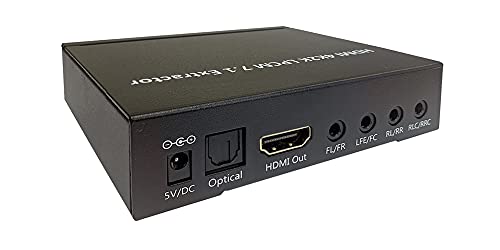
This decoder focuses on extracting uncompressed LPCM 7.1 or 5.1 audio and routing it through analog outputs, while also supporting compressed formats like Dolby Digital, AC3, and DTS via optical. It includes EDID dip switch control for selecting the desired digital format. It does not require HDMI output from a TV to deliver audio to connected devices. Best for users who want multi-channel PCM with reliable optical output. Caution: Some users may need manual EDID adjustments to obtain the preferred audio format.
Who it’s best for: A/V enthusiasts with a need to convert high-channel PCM to analog and to access older amplifiers via optical or RCA connections.
Why selected: The device provides explicit PCM/LPCM handling with multiple analog outputs, supporting larger surround configurations through an optical path.
Buying Guide: Key Considerations For HDMI To Analog Audio Converters
- Output formats: Decide between 2.0 PCM vs multi-channel PCM/LPCM and whether you need optical/coaxial or RCA/3.5mm outputs. Look for devices that explicitly state PCM/LPCM support and the maximum sample rate.
- Input versatility: If your setup includes multiple source devices, a unit with ARC/eARC plus Toslink or coaxial inputs can simplify connections.
- HDMI specifications: Check for ARC/eARC compatibility and the TV’s supported formats. Some devices require enabling ARC, CEC, or specific DIP-switch configurations.
- Video considerations: If you need simultaneous high-resolution video and audio extraction, ensure the device supports your video standard (4K@60/120Hz, HDR, HDCP 2.2).
- Latency and synchronization: Some setups can exhibit lip-sync or delay issues. Favor models with reliable audio synchronization and adjustable output levels if available.
- Physical compatibility: Assess the number and type of outputs (RCA L/R, 3.5mm, optical, coaxial) to ensure compatibility with your receivers, soundbars, or headphones.
FAQ
- Can these adapters handle Dolby Digital or DTS and still output multi-channel audio?
– Many listed models focus on PCM/LPCM output; some support compressed formats via optical outputs. Check each product’s features for specific support notes. - Will I need to adjust my TV settings to use ARC/eARC with these devices?
– Yes. Enabling ARC/eARC, and sometimes CEC on the TV, is typically required for proper audio transmission to the extractor. - Is simultaneous output to multiple ports supported?
– Some devices support simultaneous 3.5mm, RCA, and digital outputs, while others limit outputs to a single path at a time. Verify the product’s output documentation before purchase. - Do these units require a powered connection?
– Most HDMI ARC extractors require external power to drive analog outputs and to manage multiple formats. - Can these converters improve sound quality from a basic TV speaker?
– They can provide a cleaner analog signal to better amplifiers or headphones, especially when PCM/LPCM is utilized.