
Best Mixers for Radio Broadcasting: Top Picks for Professional Sound on Air
If your goal is clean, broadcast-ready audio for radio or live streaming, these mixers cover a range of professional needs—from compact two-channel setups to feature-rich USB interfaces. The buyers best served by these products include solo broadcasters seeking plug-and-play simplicity, podcasters needing built-in effects, and small studios requiring reliable mic preamps and monitoring. Below is a quick summary of the five selected options to compare key points at a glance.
| Product | Best For | Notes |
|---|---|---|
| RDL ST-MX2 Universal Audio Mixer | Two-channel setups | Selectable mic/line inputs; mic and line outputs |
| Razer Audio Mixer | Digital streaming and gaming broadcasts | 4-channel design; built-in processing; USB |
| Aurikall Live Sound Card Kit with BM800 | Starting broadcasts and basic recording | Full kit; condenser mic; multi-voice effects |
| GagalU Sound Card Voice Converter Set | Compact, versatile vocal recording | Microphone and sound card with effects |
| Aurikall Live Sound Card and BM800 Kit | Multidevice streaming | Suspension arm; built-in effects |
RDL ST-MX2 Universal Audio Mixer

The RDL ST-MX2 is a compact two-channel mixer with selectable mic or line inputs and outputs. It is best for small broadcast setups where a simple, reliable control surface is needed. The two inputs can handle different sources, while the simultaneous mic and line outputs support flexible routing for on-air monitors or live feeds. Best for solo hosts or small studios, where a minimal signal path reduces potential noise. Limitation: it offers a focused feature set—no extensive digital effects or USB interface built-in.
Razer Audio Mixer: All-in-One Streaming

The Razer Audio Mixer is a 4-channel digital mixer designed for streaming and broadcasting. It integrates an XLR mic preamp and built-in voice processing. Use this when you need multiple inputs (game audio, chat, mic, system audio) and want to tailor levels across channels with a hardware interface. Best for streamers who want a single device to manage several audio sources with minimal software dependency. Limitation: the included processing relies on configuration via software (Razer Synapse), which may require setup time.
Aurikall Live Sound Card with BM800 Kit

This kit pairs a multifunction live sound card with a BM800 condenser microphone and a robust aluminum body. It offers microphone, treble, bass, record, music, and monitor volume controls, plus 12 built-in effects for immediate on-air presence. It’s well-suited for beginners or hobbyists who want an all-in-one setup for streaming, podcasting, and small broadcasts. Limitation: it’s a kit that emphasizes ease of use over extensive professional routing options.
Aurikall Live Sound Card Kit With Boom Arm
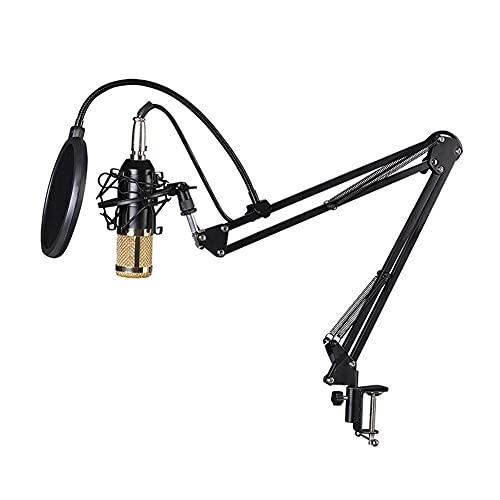
This complete kit includes the live sound card, a BM800 condenser microphone, and an adjustable suspension boom arm. It’s designed for flexibility across recording, streaming, and broadcasting on computers, laptops, or smartphones. The mixer includes knobs for mic, treble, bass, and monitor control, supporting dual mobile device use. Best for creators needing a portable, integrated setup with an adjustable mount. Limitation: the integrated effects are pre-set; advanced post-processing may require separate software.
Buying Guide: Key Purchase Considerations
What is your primary use case? For solo broadcasts or podcasts, a two-channel mixer like the RDL ST-MX2 can be ideal for minimal signal paths. If you need multiple inputs and digital control for streaming, consider the Razer mixer for its channel flexibility and onboard processing. For entry-level setups, complete kits from Aurikall provide a mic and sound card with built-in effects, simplifying configuration.
What input types do you require? If you rely on XLR microphones, confirm the preamp quality and gain range. If you use line-level devices (phones, MP3 players), ensure the mixer handles line inputs cleanly. Do you need USB connectivity? If you plan to record directly to a computer, a USB-enabled mixer or sound card simplifies workflow.
Are built-in effects important? Some kits include preset effects or voice processing. Consider how much you want to rely on those effects versus external software. Is portability a factor? Compact two-channel units or complete desk kits with a boom arm may be best for on-the-go broadcasts.
What about upgradeability? A mixer with modular inputs or upgradeable software control can be more future-proof for evolving broadcasting needs. Check whether the device supports additional mics, headphones, or external processors as your setup grows.
FAQ
- What is the simplest mixer for beginners starting a radio broadcast?
The two-channel RDL ST-MX2 offers straightforward inputs and outputs without complex setup. - Do these mixers support USB recording directly to a computer?
Some models like the Razer mixer include USB connectivity for direct computer use; check the product specs to confirm. - Can I use XLR microphones with these mixers?
Yes, several options include XLR mic preamps or support external XLR mics—verify gain ranges in the specs. - Are built-in effects essential for live broadcasting?
Not essential, but built-in effects can add immediate polish; for deeper processing, external software is often preferred. - What should I consider for portable broadcast kits?
Look for all-in-one kits with a mic, sound card, and a stable mount or boom arm for flexibility. - Is a dedicated outdoor mixer necessary for field reporting?
For field reporting, a compact, durable mixer with battery or portable power options is recommended; the listed indoor-focused units are best for studio use.