
Best Optical to Headphone Converter for Clear Digital-to-Analog Audio
Looking for the best optical to headphone converter to upgrade your home theater or gaming setup? This guide highlights five top options that convert optical (SPDIF/Toslink) signals into 3.5mm analog output. It focuses on models suitable for amplifiers, soundbars, and headphones. Each pick is explained with who it’s best for, why it was selected, and a practical limitation to consider.
The following table compares key details at a glance. Use it to quickly identify which converter works best for your device type, such as TVs, consoles, or high-fidelity audio chains.
| Product | Best For | Notes |
|---|---|---|
| LiNKFOR 3.5mm to SPDIF Converter | General entertainment systems; preserving fidelity | 2-channel PCM, 48K output |
| Tackston 192KHz DAC SPDIF Optical to 3.5mm AUX | High-resolution audio from optical to headphones/speakers | Up to 192KHz/24-bit; note on TV remote control |
| ESWN DNXB 192KHz Optical to 3.5mm | 192kHz-capable setups; simple optical-to-aux | Not reversible; PCM/Stereo guidance |
| PROZOR 192kHz Digital to Analog Converter | HD TVs and set-top boxes needing a built-in amp | SPDIF to 3.5mm with amplification |
LiNKFOR 3.5mm to SPDIF Converter

Best for: Everyday multimedia setups where preserving digital audio fidelity matters. This LiNKFOR model converts 3.5mm analog signals into a Toslink SPDIF digital output, suitable for amplifiers and soundbars that accept digital input. It outputs 2-channel PCM at up to 48K, which is common for TVs and media players.
Why selected: It provides a straightforward path from a legacy 3.5mm source to digital optical, enabling digital sound processing while maintaining a clean, uncompressed signal.
Limitation: It is not a bidirectional DAC; you cannot convert optical signals back to 3.5mm with this unit. Use this when your source is analog and you want a digital output for compatible receivers.
Tackston 192KHz DAC SPDIF Optical to 3.5mm AUX

Best for: Audiences seeking high-resolution audio from optical sources to headphones or speakers, with a clear emphasis on 192KHz sample rates. This unit converts optical/TOSLINK input into a 3.5mm AUX output. It cannot convert in the reverse direction.
Why selected: Its 192KHz/24-bit support translates to high-fidelity sound for compatible TVs and players, delivering improved detail and dynamic range over lower-rate converters.
Limitation: The TV remote may not control playback volume while connected; adjust volume on the playback device itself for optimal control.
ESWN DNXB 192KHz Optical to 3.5mm
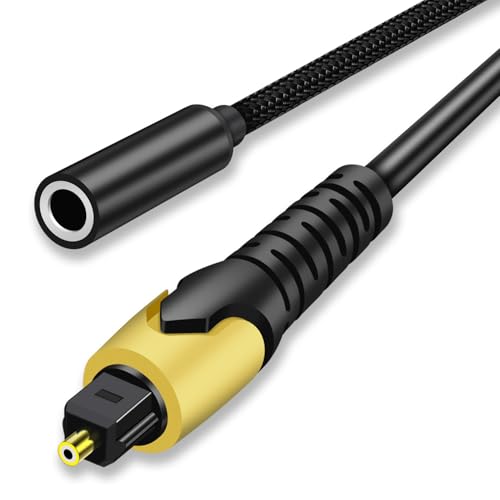
Best for: Users who need a specific optical-to-aux solution with high sampling rates and straightforward setup. The product outputs from optical to a stereo 3.5mm jack, supporting up to 192KHz and 24-bit data streams.
Why selected: It clearly states the 192kHz capability and includes guidance to set the source to PCM/Stereo for proper operation.
Limitation: Not reversible; cannot convert 3.5mm analog to optical. Ensure your source is optical and your destination accepts analog input.
PROZOR 192kHz Digital to Analog Converter

Best for: Home entertainment setups needing a robust DAC that converts SPDIF/Toslink to a 3.5mm stereo output with an integrated amplification stage. This model emphasizes a built-in amplifier for powerful sound delivery.
Why selected: The built-in amplifier helps drive headphones or small speakers directly from a digital source, which is useful for compact rooms or PC setups without a separate amplifier.
Limitation: While it supports high-quality conversion, it depends on the input being a digital SPDIF optical signal; verify compatibility with your device’s output format and PCM settings.
Buying Guide: How To Choose The Right Optical To Headphone Converter
Key questions to guide your purchase:
- What is the source and destination? If you’re converting from optical to 3.5mm, look for a straightforward SPDIF to AUX path and confirm sample rate support.
- Is bidirectional conversion required? Some devices only convert optical to analog. If you need reverse conversion (analog to optical), choose a model explicitly advertising reversible functionality.
- What sample rate do you need? For high-fidelity audio, seek units supporting up to 192KHz/24-bit and verify compatibility with your TV, game console, or audio player.
- Do you need built-in amplification? If your headphones or passive speakers require more power, prioritize a converter with an integrated amplifier.
- What about device control? Some TVs limit remote control of volume when using external DACs. Plan to adjust volume on the playback device if necessary.
- Setup simplicity and compatibility: Prefer devices that clearly indicate PCM/Stereo mode requirements to avoid playback issues on LG or Samsung TVs and other sources.
Common Scenarios And Recommendations
- Bedroom TV with wired headphones: Consider a converter with a built-in amplifier and clear PCM output guidance, so you can drive headphones directly from optical output.
- Home theater with soundbar: Choose a model that reliably delivers 2-channel PCM through Toslink to your soundbar’s optical input when it supports separate analog-to-digital processing.
- PC or game console setup: If you need high-resolution audio from optical to headphones, prioritize 192KHz/24-bit support and a simple, dependable optical input path.
- Audiophile listening with DAC emphasis: Look for units advertising detailed sample rate support (192KHz) and a clean analog 3.5mm output for precise headphone listening.
FAQ
- Can I use these converters to go from 3.5mm to optical?
Most listed models are unidirectional (optical to analog). They convert optical input to 3.5mm output, not the reverse. - Will all TVs output 192KHz through optical?
Not always. Check your TV’s optical output settings and ensure PCM/Stereo mode is enabled to maximize compatibility. - Is a built-in amplifier necessary?
Only if your headphones or speakers need extra power. If your devices have sufficient input sensitivity, a DAC-only model may suffice. - Do these work with soundbars?
Yes, provided the soundbar accepts optical input and you route to the correct analog/digital path as supported by the converter. - Will volume control work remotely?
Volume control behavior varies by device. Some TVs don’t pass through remote commands when using external DACs; adjust volume directly on playback equipment.