
Best Over the Ear USB Headset With Microphone for Clear Calls and All‑Day Comfort
Looking for an over‑the‑ear USB headset with a microphone that delivers clear calls, comfortable wear, and reliable USB connectivity? This guide highlights five top options well suited for office work, online meetings, call centers, and remote learning. Each model is evaluated for comfort, sound quality, microphone performance, and compatibility. Whether you need noise suppression, in‑line controls, or universal USB compatibility, you’ll find practical picks here. The buyer can compare features quickly to decide which headset fits daily communication and productivity needs.
| Product | Best For | Key Benefit | Limitations |
|---|---|---|---|
| AOC USB Headset with Microphone for PC (B0GT9B8KLD) | Office workers and call centers | Noise‑cancelling mic and premium 40mm drivers | Wired USB only; lightweight design |
| EKSA H8 USB Headset | Teams/Zoom professionals needing versatile USB/USB‑C | ENC mic and 40mm drivers, 270° mic with in‑line controls | 3.5mm jack limitations on mic controls |
| Lenovo 115 USB Headset | Students and remote workers seeking simple USB A/C peace | Unified design with both USB‑A and USB‑C compatibility | Basic inline controls; no dedicated mute button indicator |
| Razer Kraken V3 X | Gamers and casual office users who value light weight | Lightweight build with TRIFORCE 40mm drivers and Hyperclear mic | Gaming focus; may be extraneous for pure calls |
| EKSA E1000 USB PC Gaming Headset | PC gamers and multi‑purpose users needing surround sound | Driver‑free 7.1 surround and 50mm drivers | Not ideal for users requiring pure stereo for meetings |
AOC USB Headset With Noise‑Canceling Mic

The AOC headset uses a 90° adjustable noise‑cancelling boom mic to capture clear speech and filter ambient noise. It features premium 40mm drivers for balanced audio suitable for calls, training videos, and multimedia. Comfort is prioritized with soft protein‑memory ear cushions and a lightweight frame to reduce fatigue during long shifts. Best for office environments, call centers, and remote work where reliable voice quality is essential.
Best for: Office workers and call centers needing clear calls and stable USB connectivity. Caution: Over‑the‑ear design may feel snug for users with larger ears after long wear.
EKSA H8 USB Headset With Microphone

EKSA H8 delivers crystal‑clear HD sound with 40mm drivers and an ENC microphone that reduces low‑frequency noise. The headset offers flexible connectivity via USB‑C, USB‑A, or 3.5mm jack, aligning with many work devices. The 270° adjustable boom mic helps ensure precise voice pickup, while comfortable memory foam ear cushions support long sessions. Choose this for multi‑platform compatibility and straightforward plug‑and‑play setup.
Best for: Professionals using multiple devices (PC, laptop, or mobile) who value versatile USB/USB‑C compatibility. Caution: 3.5mm mode does not support mic controls, which may be limiting for some users.
Lenovo 115 USB Headset
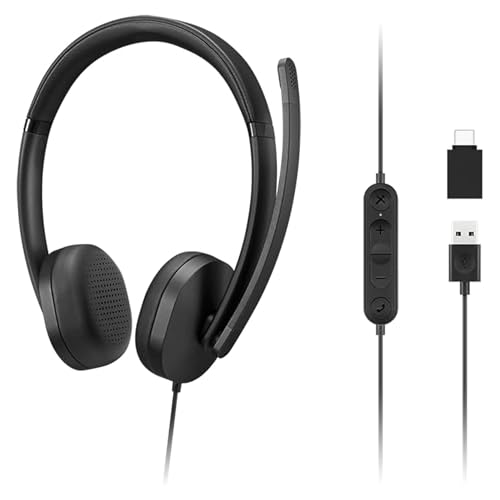
The Lenovo 115 emphasizes a unified ergonomic design with USB‑A and USB‑C connectivity for broad compatibility across devices. Inline controls simplify volume management and call handling, making it a practical choice for students and remote workers. The design focuses on ease of use and comfort during long study or work sessions.
Best for: Students and professionals who want universal USB compatibility in a simple, compact headset. Caution: May lack advanced mic noise suppression features found on higher‑end models.
Razer Kraken V3 X

The Razer Kraken V3 X is a lightweight gaming headset with TRIFORCE 40mm drivers designed for bright highs and strong lows. The Hyperclear cardioid mic improves voice pickup while reducing ambient noise. It suits gamers who also need reliable headset performance for calls and online meetings. Best for: Users who want a light, comfortable headset with strong gaming and casual communication capabilities. Caution: Primarily gaming‑focused features; not optimized for studio‑grade voice work.
EKSA E1000 USB PC Gaming Headset

EKSA E1000 provides driver‑free 7.1 surround sound and 50mm drivers for immersive audio, suitable for gaming and multimedia. The headset includes a selectable mic and a USB connection for straightforward setup on PC. Best for: Multi‑purpose users who want immersive sound for games and clear voice communication during meetings. Caution: The 7.1 feature may be less perceptible on some devices and requires compatible software to access the surround modes.
Buying Guide
What to consider when choosing an over‑the‑ear USB headset with a microphone
- Connection type: USB‑A, USB‑C, or dual compatibility. USB‑C is common on modern devices, but some PCs still rely on USB‑A.
- Microphone quality: Look for noise suppression, mic boom adjustability, and pickup direction to ensure clear communication in busy environments.
- Driver type: Larger drivers (40mm) typically deliver richer audio; consider stereo vs. surround depending on usage (calls vs. gaming).
- Comfort: Ear cushions, headband adjustability, and overall weight impact long‑term wearability.
- Compatibility: Check software compatibility with Teams, Zoom, Skype, or other conferencing apps; in‑line controls can aid workflow.
- Durability and warranty: Wired headsets generally offer robust build; verify cable strain relief and bend radius.
FAQ
- What makes an over‑the‑ear USB headset better for calls than wireless?
A wired USB headset provides stable connection, no battery management, and consistent audio quality without interference. - Is a noise‑cancelling mic essential for office calls?
It helps reduce ambient noise, improving voice clarity in busy environments, though mic quality also depends on microphone design. - Can USB headsets work with both Windows and macOS?
Most USB headsets are plug‑and‑play on both, but some features may vary by OS and software. - Should I choose RGB lighting or gaming features for work use?
For professional settings, prioritize microphone quality, comfort, and compatibility over gaming aesthetics. - Do all USB headsets support in‑line controls?
Many do, but features vary; verify mute, volume, and mic controls before purchase if needed.