
Best USB Computer Speakers for Monitors and Desks: Clear, Powerful Sound Options
Answering the typical buyer question “which speakers connect best to a monitor?” this guide highlights five reliable USB and wired speakers ideal for monitor setups. These options suit: office desks needing compact, unobtrusive sound; students who want simple USB-powered audio; and gamers or multitaskers seeking clear voices and solid bass without Bluetooth. The top picks cover USB-C compatibility, 3.5mm AUX, and plug-n-play ease for Windows, macOS, ChromeOS, and Linux.
| Product | Best For | Key Benefit |
|---|---|---|
| XKX Computer Speakers for Desktop | USB-C/USB users | Adaptive-channel-switching with deep bass |
| Amazon Basics Stereo 2.0 Speakers | Budget setups | Simple USB-powered, inline volume control |
| FUNLOGY 14W USB Speakers | Compact desks | 30° tilt design for direct listening |
| 1Mii 3.5mm Desktop Speakers | Versatile devices | Wide 3.5mm compatibility, front volume knob |
| LENRUE A39PRO 10W Sound Bar | Under-monitor space saver | Light, stereo sound with easy controls |
XKX Computer Speakers for Desktop PC Monitor

Best for USB and USB-C users who want straightforward, powerful sound from a compact bar. The XKX speakers include USB compatibility with Windows, macOS, ChromeOS, and Linux. The built-in USB-C adapter broadens compatibility for devices that rely on USB-C, such as newer laptops and tablets. With dual drivers and dual passive radiators, they deliver rich stereo with strong bass for movies, gaming, and productivity. Caution: Not compatible with monitors or projectors that require separate audio outputs on the display.
Amazon Basics Stereo 2.0 Speakers for PC or Laptop

Better for budget-conscious buyers seeking a simple, two-speaker setup. These USB-powered, 2.0 desktop speakers come in a 2-pack with inline volume control for quick adjustments. They are best for basic computer audio on PCs or laptops where plug-and-play is preferred. Limitation: lack of Bluetooth and additional features means less versatility for mobile listening or media with complex needs.
FUNLOGY Speaker – 14W Stereo USB Powered

Best for desk space with impressive desktop sound in a palm-sized form. The 14W total output uses dual 48mm drivers and passive radiators for balanced mids and punchy bass. A 30° tilt design directs sound toward the listening area, making it ideal for monitors or laptops. It is a straightforward setup with USB power and 3.5mm audio, but lacks advanced wireless options.
1Mii 3.5mm Computer Speakers

Choose this for broad compatibility via a standard 3.5mm AUX connection. The dual 3W drivers deliver clear vocals and detailed audio, suitable for movies, music, and games. A front rotary volume knob provides quick, dry control. Limitation: pure 3.5mm may mean lower convenience on devices without a dedicated audio out and may require a USB power source for best performance.
LENRUE A39PRO Computer Speakers

Best for under-monitor setups where desk space is at a premium. The A39PRO uses a 10W stereo configuration with clear audio and built-in lighting to enhance ambiance. It supports 3.5mm audio input with USB power. Caution: the lighting feature is decorative and may not be preferred in dark environments if distractions are a concern.
[Upgraded] LIELONGREN Computer Speakers

Best for Windows-based machines and diverse OS environments with easy plug-n-play USB power and 3.5mm audio. The compact sound bar sits beneath the monitor, reducing desk clutter. It emphasizes straightforward setup and reliable performance, making it a practical choice for mixed-device households. Limitation: non-Bluetooth and no built-in microphone or headphone jack.
TAOTOSUNE Computer Speakers
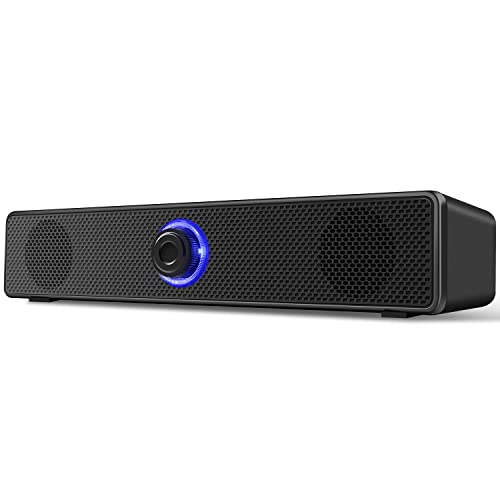
Best for users who want a straightforward, wired 3.5mm and USB-A setup without Bluetooth. The 6W full-range drivers provide immersive stereo sound and a steady, reliable listening experience for movies, music, and gaming. Caution: the product notes emphasize full reliance on a 3.5mm and USB-A connection, which may limit use with devices lacking those ports.
Buying Guide
- Connection type: Prioritize USB-powered for plug-and-play simplicity or USB-C for newer devices. If you need device-to-device versatility, look for 3.5mm AUX alongside USB power.
- Sound quality: Consider driver size and bass capability. Dual drivers and passive radiators generally deliver stronger bass and clearer mids for monitors and desks.
- Space and placement: Under-monitor sound bars save desk space; compact desktop speakers fit smaller setups without crowding the workspace.
- Compatibility: Check operating system support (Windows, macOS, ChromeOS, Linux) and whether USB-C adapters are included or required.
- Controls: Front-facing volume knobs and inline or handset controls affect ease of use during work or gaming sessions.
- Extras: Lighting or tilt design can improve immersion but may add distractions; consider your ambient environment.
FAQ
- Q: Do these speakers work with monitors that don’t have audio out?
A: Yes, if the monitor provides USB-C or you connect via a computer’s USB audio output and 3.5mm jack. - Q: Is Bluetooth available on these options?
A: Most listed models are wired or USB-powered; Bluetooth is not included in these selections unless stated. - Q: Which is best for gaming?
A: Models with larger drivers and passive radiators tend to deliver punchier bass and clearer sound; the 14W FUNLOGY option is a strong candidate. - Q: Are USB-C adapters included?
A: Some come with built-in USB-C adapters or require an external USB-C to USB adapter for devices that only offer USB-C. - Q: Do I need additional software to use these?
A: No driver installation is required for most; plug-and-play with default system audio is typically sufficient. - Q: Can these replace laptop speakers for video calls?
A: They can improve audio clarity for media and calls, but check for a built-in microphone if you need conferencing features.