
Best Laptop Direct Boxes for Clean, Interference-Free Audio
Direct boxes (DI boxes) for laptops provide a clean, balanced signal for PA systems and recording gear. This guide helps buyers choose five reliable options, highlighting who each product is best for and where to avoid common pitfalls. The top picks are suitable for presenters, musicians, educators, and event technicians seeking stable connections from consumer devices to pro audio gear.
Summary of selected products:
| Product | Brand | Best For |
|---|---|---|
| Kopul LT-PDI Laptop One-Channel Passive Direct Box | Kopul | AV setups needing stereo-to-mono balance and ground lift |
| Rapco Horizon LTIGLBLOX Laptop Interface With Ground lift | Rapco Horizon | Compact, rugged DI with ground lift for live sound |
| Radial StageBug SB-5 1-channel Passive Laptop Direct Box | Radial Engineering | Consumer device audio optimized DI |
| On-Stage DB100 Passive Laptop Direct Box | OnStage | 3.5 mm sources needing easy access and cable comfort |
| Radial USB-Pro 2-Channel Active Instrument Direct Box | Radial Engineering | USB laptop DI with two outputs and headphone monitoring |
Kopul LT-PDI Laptop One-Channel Passive Direct Box
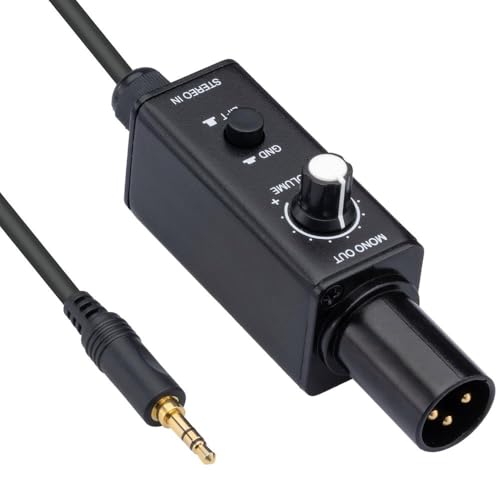
The Kopul LT-PDI converts unbalanced stereo line-level signals from laptops and tablets into a balanced mono mic-level output. This makes it well-suited for presentation setups, classrooms, and small venues where a stable, noise-free path to a PA system is needed.
Best for: AV integrators and educators who require a simple, passive solution with balanced output and minimal setup. The ground lift switch helps address hum on longer runs.
Why selected: Its straightforward design, compatibility with common consumer devices, and a ground lift option provide practical benefits for typical laptop-to-P.A. connections.
Caution: As a single-channel DI, it processes mono mic-level output; stereo-to-mono handling is implicit but may require additional sequencing for stereo sources.
Rapco Horizon LTIGLBLOX Laptop Interface With Ground Lift

This self-contained unit converts consumer-grade input to a mic-level balanced output and includes a ground lift switch. It’s a compact option that fits well into small to mid-sized live rigs or classroom deployments where reliable isolation from ground loops is needed.
Best for: Users who need a rugged chassis and a dedicated ground-lift feature to minimize hum in venues with varied electrical installations.
Why selected: Its ground lift and solid build make it a dependable choice for frequent laptop-based DI tasks in live settings.
Caution: Limited to one channel; may require a separate device for stereo sources or additional channels in larger rigs.
Radial StageBug SB-5 1-channel Passive Laptop Direct Box
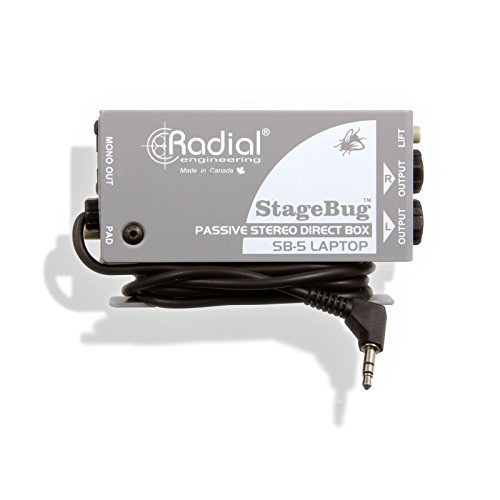
The Radial StageBug SB-5 is a 1-channel passive DI optimized for consumer device audio. It provides a sturdy, stage-ready solution that delivers a clean, balanced signal to mixers and interfaces while minimizing impedance issues common with laptop outputs.
Best for: Musicians and presenters who need a reliable single-channel DI with a pro-grade chassis and straightforward operation.
Why selected: Radial’s reputation for durability and sound quality makes this a safe, long-term choice for live sound and rehearsal rooms.
Caution: Being a single-channel device, it may require additional units for multi-source setups or stereo laptops.
On-Stage DB100 Passive Laptop Direct Box

The On-Stage DB100 uses a 3.5 mm input to feed a balanced mic-level output via XLR, with an integrated 10′ cable for easy access. This makes it a convenient option for laptop users who want a compact, all-in-one solution for quick setups and educational environments.
Best for: Classroom instructors, conference presenters, and small venues needing a ready-to-go DI with a short, built-in reach.
Why selected: The included cable reduces cable clutter and setup time, a practical benefit for high-turnover events.
Caution: The 3.5 mm input may not be ideal for some high-output laptop headphone jacks; ensure your source level is appropriate to avoid clipping or noise.
Radial USB-Pro 2-Channel Active Instrument Direct Box

The Radial USB-Pro integrates a two-channel output with balanced lo-z outputs, plus 24-bit/96 kHz converters and a built-in headphone amp. This active DI is designed for complex laptop-based performances where digital audio routing and monitoring are required in one unit.
Best for: Musicians and technicians needing two-output versatility and on-board digital-to-analog capabilities for mobile or studio use.
Why selected: It combines high-quality conversion with direct headphone monitoring, enabling precise performance feedback and flexible routing.
Caution: As an active device, it requires power; ensure your setup includes appropriate power sources and headroom to avoid noise or dropout in live scenarios.
Buying Guide
Key factors to consider when selecting a laptop DI box include signal type, channel count, and the environment you’ll use it in. Passive vs. active modes affect headroom and noise performance in different setups. A ground lift switch helps reduce hum on long cables or in rooms with grounding issues. Durability matters for travel and on-stage use, and built-in cables or short lead options can simplify quick setups.
What source will you connect?
If you’re connecting from consumer laptops or tablets, look for DI boxes with 3.5 mm or stereo mini-inputs and balanced XLR outputs. For USB-enabled laptops, an active DI with proper conversion might be beneficial, especially if you need to monitor via headphones.
How many channels do you need?
Most laptop-related needs are met with one-channel DIs. If you routinely manage multi-source events, consider a two-channel or two-box solution to minimize setup time and cable management.
Do you require ground lift or isolation?
Ground lift switches help mitigate hum in venues with complex electrical grounding. If your environment tends to produce ground loop noise, this feature is highly advantageous.
Durability and portability
Rugged metal housings, especially for live venues or campus events, reduce the risk of damage. Built-in cables can cut clutter, but ensure they are long enough for your typical layouts.
Compatibility with your gear
Confirm that the DI’s outputs match your mixer, audio interface, or PA system requirements (balanced XLR outputs are common for pro gear). Some units also offer headphone monitoring or multiple outputs for flexible routing.
Budget and future-proofing
Investing in a well-built DI with good noise rejection and solid connectors tends to pay off in reliability. Consider whether you might need additional channels or better isolation as your setup grows.
FAQ
- What is a laptop DI box used for? It converts unbalanced signals from laptops into balanced outputs suitable for professional audio gear, reducing noise and interference on long cable runs.
- Should I choose a passive or active DI for a laptop? Passive DIs are simple, robust, and require no power, suitable for most standard laptop connections. Active DIs provide higher headroom and conditioning for demanding sources but need power.
- Do I need a ground lift switch? A ground lift helps eliminate hum from ground loops. Choose a DI with this feature if you frequently encounter hum in venues or with certain equipment.
- Can a DI box handle stereo inputs from a laptop? Some DI boxes are designed for mono outputs. For stereo sources, use a two-channel DI or two single-channel DIs, depending on your setup.
- Is it okay to use a USB laptop with a DI box? Yes, but ensure the DI’s inputs and outputs match your devices. USB-based DI models may offer additional features like direct monitoring.
- What is the benefit of a built-in cable on a DI box? Built-in cables reduce clutter and setup time, especially in quick-setup environments like classrooms and events.